From idea to market-ready product, our NPI solutions make every stage easier, faster. Discover How We Help
Help Center

Views: 278 Author: Capital Publish Time: 2026-07-15 Origin: Site
Content Menu
● Understanding Fan Motor Overheating
● What Happens Inside an Overheated Fan Motor
>> The Layered Failure Process
● Early Warning Signs Engineers Watch For
>> Practical Indicators Before Failure
● Common Causes of Overheated Fan Motors
>> Mechanical, Electrical and Environmental Factors
>>> Environmental and System Causes
● AC vs. DC Fan Motors Under Thermal Stress
>> How Different Designs Respond to Overheating
● Overheated Fans in Communication Systems
>> What Happens in Real Installations
● How Professionals Diagnose Overheated Fan Motors
>> Step‑By‑Step Diagnostic Workflow
● Preventing Fan Motor Overheating in Continuous Operation
>> Design and Maintenance Best Practices
● Practical Steps End Users Can Take
>> Simple Actions That Protect Your Fans
● FAQs
>> 1. How hot is "too hot" for a fan motor?
>> 2. Can a fan motor recover after repeated overheating?
>> 3. Why do cheap fan motors overheat sooner?
>> 4. What is the most common cause of overheating in AC fan motors?
>> 5. How often should fan blades be cleaned?
When a fan motor overheats, it rarely fails all at once—instead, it moves through a predictable chain of stress, insulation breakdown, performance loss, and finally irreversible damage that can shut down critical equipment or even create safety risks. As an engineer working with DC fans and AC fans for telecom, networking, industrial and communication systems, I've seen the same patterns repeat across projects, from lab prototypes to long‑running field installations. [fanacdc]
Overheating simply means the motor is operating above its designed thermal limit for a sustained period. Internally, the copper windings, insulation system, bearings, and electronic components are all rated to specific temperature classes and duty cycles; once those limits are exceeded, deterioration accelerates. [proventofan]
From an industry perspective, overheating is often a symptom, not the root cause. It signals underlying issues such as excess load, poor airflow, bearing wear, blocked ventilation, voltage imbalance, or inadequate system design. In mission‑critical applications—base stations, industrial controllers, communication infrastructure—this is not just "a hot fan," but an early warning that the entire thermal management strategy needs attention. [hvacfanmotor]

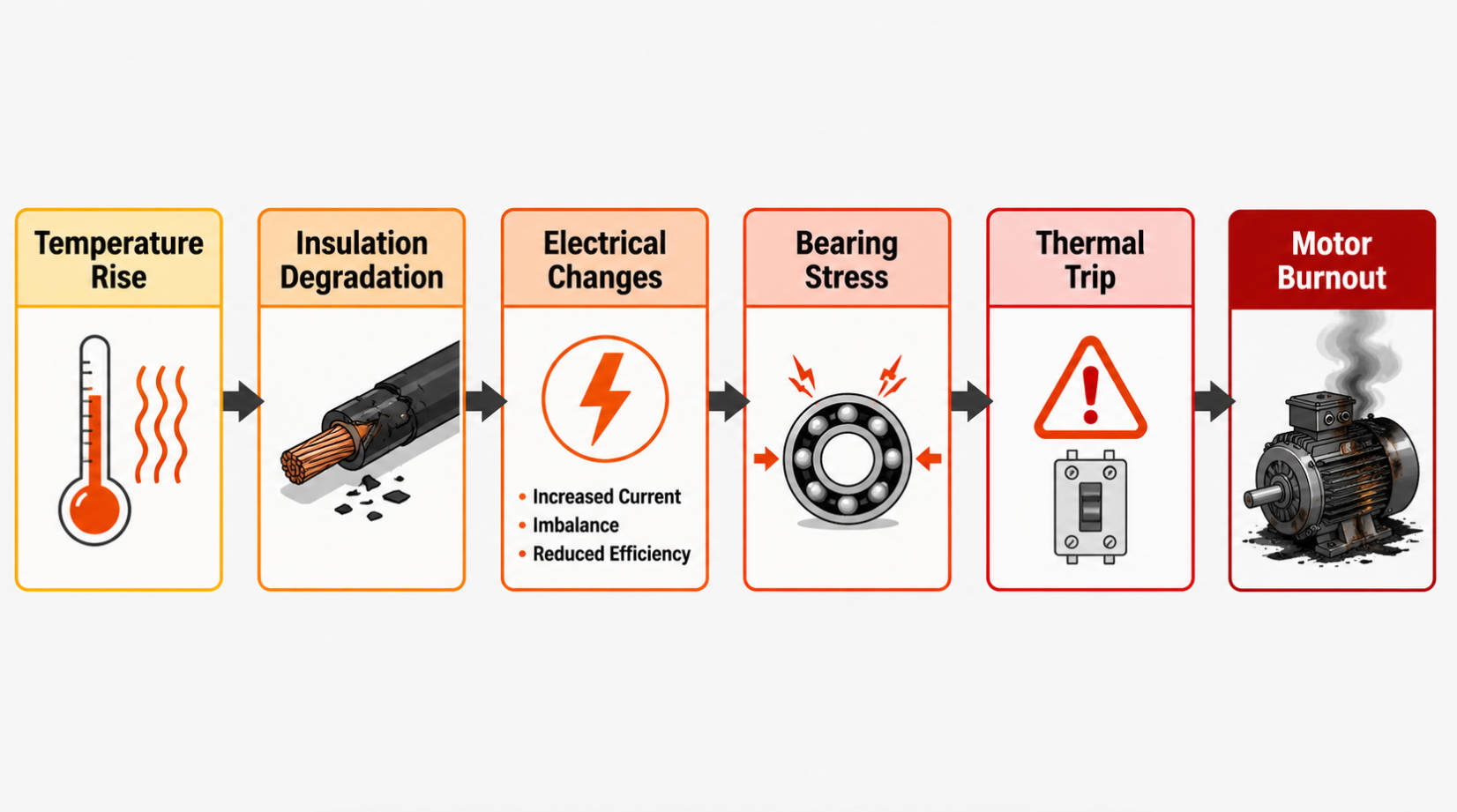
In practice, an overheated motor tends to fail in layers rather than instantly. The sequence typically looks like this: [hvacrschool]
1. Temperature rise in windings
Electrical losses and mechanical friction convert to heat, raising the winding temperature above its nominal design point. [hvacrschool]
2. Insulation degradation
Organic insulation and varnish begin to harden, crack, or carbonize, reducing dielectric strength between turns and phases. [proventofan]
3. Changes in electrical behavior
Resistance shifts, leakage paths increase, and over‑amping becomes more likely under the same load. [hvacrschool]
4. Bearing stress and lubricant breakdown
Excess heat thins lubricants, increases friction, and accelerates wear in ball or sleeve bearings. [youtube]
5. Repeated thermal trips
Thermal protection devices—embedded thermostats, thermistors or internal overloads—cut power to prevent catastrophic failure. [youtube]
6. Permanent damage or burnout
Once insulation, bearings and windings cross their threshold, the motor may fail permanently, requiring replacement. [hvacfanmotor]
From a user standpoint, this layered process translates into very specific symptoms: hot housing, unusual noise, reduced airflow, intermittent stopping, and finally complete failure. [motorsandpump]
Based on field service feedback and industry case studies, several observable signs tend to show up before a fan motor fails completely. [motorsandpump]
- Housing feels excessively hot to the touch
Technicians often report housings approaching or exceeding typical safe operating ranges for many motors. [youtube]
- Smell of hot insulation or varnish
A faint "electrical" or burnt odor around the motor compartment is an early indicator of insulation stress. [proventofan]
- Intermittent stopping and restarting
Internal thermal protection may trip and reset as the fan cycles between overheating and cooling. [youtube]
- Audible changes—hum, grinding, rattling
Bearing issues, imbalance, or rotor misalignment often show up first as noise. [youtube]
- Noticeable airflow reduction
Dust‑loaded blades, blocked vents, or slowing speed can reduce cooling capacity long before the motor fails. [hvacfanmotor]
In telecom shelters and base stations, engineers also pay attention to correlated signals: rack temperature drift, more frequent system derating, or unexpected shutdowns under otherwise normal ambient conditions. [proventofan]
From multiple industrial references and real‑world troubleshooting, most overheating problems fall into a small set of repeatable causes. [motorsandpump]
- Dirty or loaded fan blades reduce airflow, forcing the motor to work harder for the same cooling effect. [hvacfanmotor]
- Bearing wear and poor lubrication increase friction and heat generation inside the motor. [youtube]
- Misaligned or incorrect fan blades alter load and can cause sustained over‑amping. [youtube]
- Incorrect or failing capacitors in AC fan motors lead to poor starting, low efficiency and overheating. [youtube]
- Voltage outside rated range—either low causing higher current or high causing excess stress—directly impacts motor temperature. [hvacrschool]
- Loose or damaged wiring creates local heating, poor contact and instability. [hvacfanmotor]
- High ambient temperature or direct sun exposure drives up motor surface temperature even at normal load. [hvacrschool]
- Blocked vents and poor cabinet airflow trap heat around the motor and sensitive electronics. [hvacfanmotor]
- Continuous operation near maximum load without margin for peak conditions accelerates thermal fatigue. [proventofan]
In low‑cost fan designs, additional risk factors include aluminum windings, thin insulation, and minimal cooling design, which make motors more sensitive to any of the above conditions. [sffanfactory]
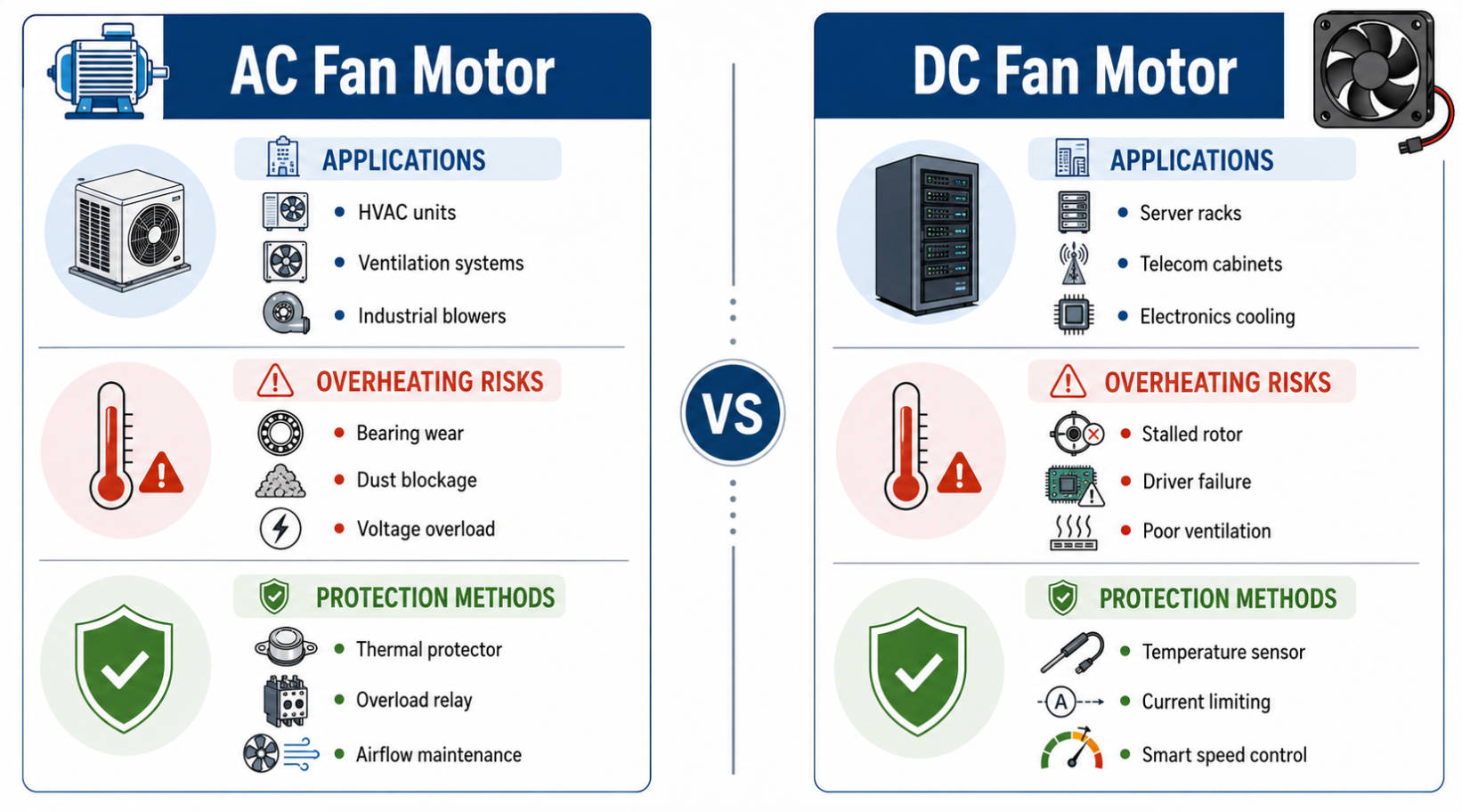
Industrial and electronics cooling systems rely on both AC fan motors and DC fan motors, and each responds differently under thermal stress due to its design. [proventofan]
| Motor Type | Typical Application | Key Overheating Risks | Protection Behavior |
|---|---|---|---|
| AC fan motor | HVAC units, appliances, larger industrial fans hvacfanmotor | Failing capacitors, voltage imbalance, high ambient, bearing wear youtube | Often uses internal overloads and thermal switches; can cycle on/off under high heat youtube |
| DC fan motor | Electronics cooling, telecom racks, network gear hvacfanmotor | Dust‑blocking blades, blocked vents, bearing friction, high system load proventofan | Often protected by thermal sensors or controller logic; may gradually reduce speed or shut down to protect electronics proventofan |
From a design standpoint, DC fans in electronics cabinets are frequently integrated into broader thermal management strategies, including temperature‑controlled speed profiles and status monitoring. AC motors, by contrast, often rely more heavily on component‑level protections like capacitors and overloads. [hvacrschool]
In practice, overheating is most visible in long‑running communication and industrial systems where uptime is critical. Across projects supplying cooling solutions to base stations, network equipment and professional communication systems, a few recurring patterns stand out: [proventofan]
- When cabinet filters are not maintained, fine dust accumulates on fan blades and heat sinks, gradually reducing cooling performance. [hvacfanmotor]
- In some outdoor communication sites, fans run continuously in high ambient temperatures, especially during summer peaks, so any bearing wear or imbalance shows up quickly as elevated motor temperatures. [youtube]
- For high‑density equipment from major brands, heat‑related issues are seldom isolated to a single fan; they often reveal broader airflow design or maintenance gaps in the entire enclosure. [proventofan]
These patterns underline why experienced engineers treat motor overheating as a system‑level signal, not just a component fault.
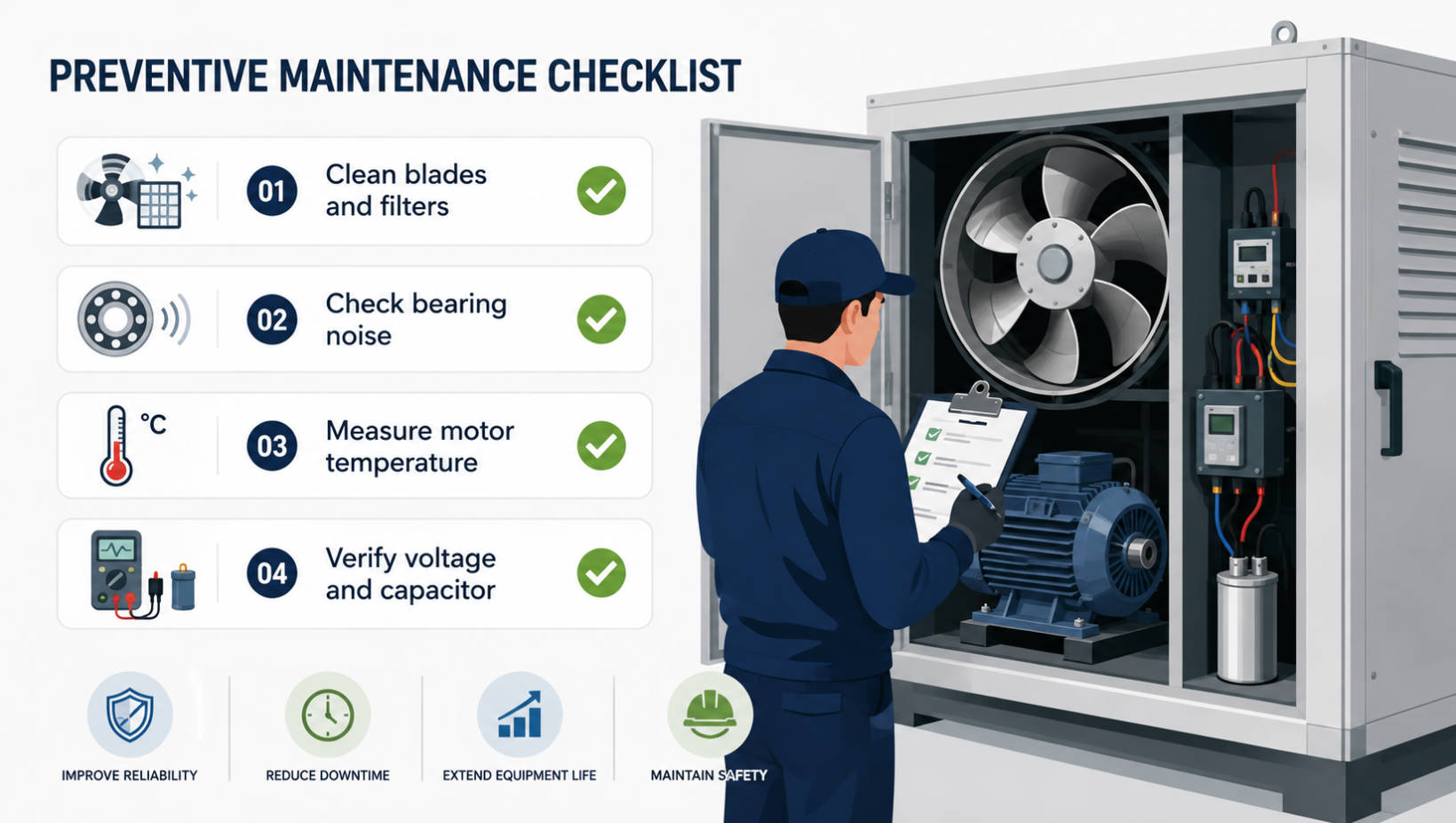
Industry guides and technician training materials show a fairly consistent diagnostic workflow when a fan motor is suspected of overheating. [youtube]
1. Verify ambient conditions and airflow
Check vents, cabinet filters, and nearby surfaces for dust, blockage or direct radiant heat. [hvacrschool]
2. Measure motor temperature
Use an infrared thermometer or contact measurement at the housing to compare against typical operating ranges and nameplate data. [youtube]
3. Inspect blades and mechanical components
Confirm blades are clean, correctly installed, and not deformed; listen for bearing noise or shaft play. [youtube]
4. Test electrical parameters
Measure voltage under load and current draw; identify any over‑amping or off‑spec values. [youtube]
5. Evaluate capacitors (for AC motors)
Use a meter to verify capacitance and replace units that fall below their rated value or show visible damage. [motorsandpump]
6. Check wiring and connections
Inspect for looseness, corrosion or damaged insulation that can create hot spots. [hvacfanmotor]
Taken together, these steps allow engineers to distinguish between normal operating heat and a genuine overheating condition that needs corrective action. [hvacrschool]
Preventing overheating is fundamentally easier than recovering from motor damage. Several practical measures consistently show strong results across industrial and electronics applications. [motorsandpump]
- Design with thermal margin
Select fans and motors with sufficient capacity above expected continuous load, especially for high‑density electronics cabinets. [proventofan]
- Maintain clean airflow paths
Schedule periodic cleaning of blades, grills, filters and vents; many guides recommend at least bi‑annual cleaning in dusty environments. [hvacfanmotor]
- Lubricate and monitor bearings
For suitable motor types, proper lubrication intervals and noise monitoring extend bearing life and reduce friction‑related heating. [youtube]
- Validate electrical components
Keep capacitors, wiring and connectors within specification through proactive checks and scheduled replacement. [motorsandpump]
- Monitor temperature and load
Use onboard sensors and controller logic in DC fan systems to detect abnormal temperature trends early and adjust speed or trigger alerts. [proventofan]
In environments like telecom equipment rooms, these measures are commonly integrated into standard preventive maintenance plans, directly reducing the incidence of unexpected thermal trips and downtime. [motorsandpump]
For operators and technicians who are not motor specialists, there are straightforward steps that dramatically lower overheating risk and extend fan life. [motorsandpump]
- Keep the fan in moderate temperature environments and avoid prolonged operation in extreme heat or cold. [youtube]
- Monitor how hot the motor housing feels during typical operation and investigate when it becomes unusually hot. [hvacrschool]
- Clean blades, grills and nearby surfaces regularly to maintain unobstructed airflow. [hvacfanmotor]
- Pay attention to new noises—hum, grinding or rattling can be early signs of bearing issues that lead to overheating. [youtube]
- For systems using AC fan motors, treat failing capacitors as a priority and replace them with correct‑value parts as soon as symptoms appear. [youtube]
These actions complement professional diagnostics and make it far more likely that early warning signs are caught before permanent damage occurs. [hvacrschool]
Acceptable surface temperature varies by motor design and insulation class, but when a housing feels uncomfortably or unexpectedly hot compared to normal operation, it should trigger a closer inspection with proper temperature measurement and specification checks. [youtube]
If overheating only triggers occasional thermal trips and the root cause is corrected quickly, the motor may continue to operate normally; however, repeated excursions above design limits accelerate insulation and bearing wear, shortening the remaining useful life even if the motor appears to recover. [hvacrschool]
Lower‑cost designs often rely on thinner insulation, less robust bearings, more marginal cooling and, in some cases, aluminum windings, which collectively reduce tolerance for high ambient temperatures, dust, and continuous operation compared to higher‑grade motors. [sffanfactory]
Industry guides consistently highlight failing or incorrect capacitors, poor maintenance leading to dirty blades or blocked airflow, and voltage conditions outside the rated range as leading contributors to overheating in AC fan motors. [youtube]
For many applications, technical references recommend cleaning fan blades and vents at least once every six months, with more frequent cleaning in dusty or industrial environments where airborne particles accumulate rapidly. [motorsandpump]
1. "Creating Helpful, Reliable, People‑First Content." Google Search Central. [developers.google]
2. LinkBuilder, "Google E‑E‑A‑T: Guide to Creating Expert Content in 2026." [linkbuilder]
3. ThatDevPro, "E‑E‑A‑T Explained | Experience, Expertise, Authority, Trust." [thatdevpro]
4. Changpeng Motor, "Troubleshooting Overheating Fan Motors: Causes and Solutions." [hvacfanmotor]
5. HVAC School, "Motor Overheating." [hvacrschool]
6. Motors & Pump, "AC Fan Motor Gets Hot: Signs, Causes, And Essential Troubleshooting Tips." [motorsandpump]
7. SF Fan, "Why Do Cheap Fan Motors Overheat After 4 Hours?" [sffanfactory]
8. Industrial overheating overview, "Industrial Fan Motor Overheating: Causes, Diagnosis, and Prevention." [proventofan]
9. Video guidance, "Reasons Why a Condensing Fan Motor is Overheating Air Conditioner or Heat Pump." [youtube]
10. Video explanation, "How to find out if your fan overheated and how you can stop that." [youtube]


