From idea to market-ready product, our NPI solutions make every stage easier, faster. Discover How We Help
Help Center

Views: 260 Author: Capital Technology Publish Time: 2026-07-29 Origin: Site
Content Menu
● Why Testing a 12V DC Fan Matters
● Step 1: Confirm the Fan Rating
● Step 2: Check the Power Source
● Step 4: Perform a Basic Spin Test
● Step 5: Measure Current Draw
>> Current interpretation table
● Step 6: Inspect Bearings and Airflow Path
● Step 7: Test the Tach Signal on 3-Wire and 4-Wire Fans
● Step 8: Test the Fan in the Actual System
● Common Fan Problems and What They Mean
● Expert Tips for Better Reliability
● FAQ
>> 1. How do I test a 12V DC fan with a multimeter?
>> 2. Why does my 12V fan spin slowly?
>> 3. Can a fan still be bad if it spins?
>> 4. What does a tach signal do?
>> 5. Should I replace a noisy fan immediately?
>> 6. Can I test a 12V fan with a battery?
A 12 volt DC fan should be easy to test, but many users still struggle to tell whether the problem comes from the fan, the power supply, the controller, or the wiring. This guide explains how to test a 12V DC fan step by step, using simple tools such as a multimeter and a regulated DC power supply, so you can diagnose faults with confidence.
For manufacturers, engineers, and maintenance teams, fast fan troubleshooting is not just about restoring airflow. It also helps reduce downtime, avoid unnecessary replacement, and identify whether the real issue is electrical, mechanical, or control-related.

A DC fan can fail in several ways: it may not start, spin slowly, make noise, draw abnormal current, or report no tach signal. Each symptom points to a different root cause, so a proper test method is important before replacing the fan.
In industrial and telecom applications, fan health affects thermal stability, equipment reliability, and product lifespan. That is why E-E-A-T-friendly technical content should explain not only how to test, but also what the results mean and when a fan should be replaced.
Before you begin, prepare the following tools:
- A regulated 12V DC power supply.
- A digital multimeter.
- Test leads or alligator clips.
- A small brush or compressed air for cleaning.
- Optional: a tachometer or oscilloscope for advanced fan testing.
Using a stable power source is important because under-voltage can make a healthy fan look defective, while a current test can reveal hidden bearing drag or internal failure.
Disconnect power before removing or probing any fan wiring. Do not touch rotating blades, and never test a fan with damaged insulation or exposed conductors.
If the fan is part of a larger powered assembly, confirm the circuit has discharged before disconnecting connectors. This is especially important in industrial equipment where higher internal voltages may be present.
Check the fan label or datasheet first. A fan rated for 12V DC should normally be tested with a 12V source, not 5V or 24V, unless the manufacturer specifies a different operating range.
Also identify the wire configuration:
- 2-wire fan: power and ground.
- 3-wire fan: power, ground, tach signal.
- 4-wire fan: power, ground, tach signal, PWM control.
Knowing the wire type helps you test the fan correctly and avoid confusing a control issue with a motor failure.
The most common mistake is assuming the fan is broken when the supply is actually wrong. Measure the DC output of the supply with a multimeter and verify that it is close to 12V.
If the supply voltage is too low, the fan may start slowly, stall, or refuse to spin. If the voltage is unstable, the fan may pulse, chatter, or restart repeatedly.
| Test Item | Normal Result | What a Bad Result May Mean |
|---|---|---|
| Output voltage | Close to 12V DC | Weak adapter, wiring loss, or controller issue |
| Polarity | Correct positive and negative | Reverse wiring or connector mistake |
| Stability | Steady output | Power fluctuation or poor regulation |
For DC fans, polarity matters. Reverse polarity can prevent startup and may damage some fan circuits.
Use the multimeter to identify the positive and negative leads, then connect the fan to the correct terminals on the power supply. If the fan does not spin, immediately disconnect and recheck polarity before moving on.

Apply 12V DC directly to the fan for a short test. A healthy fan should start promptly and run smoothly without scraping, clicking, or wobbling.
Pay attention to these signals:
- No movement: possible open circuit, seized rotor, or dead driver.
- Slow or weak rotation: low supply voltage, worn bearings, or excessive friction.
- Loud noise or vibration: worn bearings, blade damage, or poor mounting.
- Intermittent spinning: unstable supply, damaged PCB, or internal fault.
This simple test is often the fastest way to separate an electrical failure from a mechanical one.
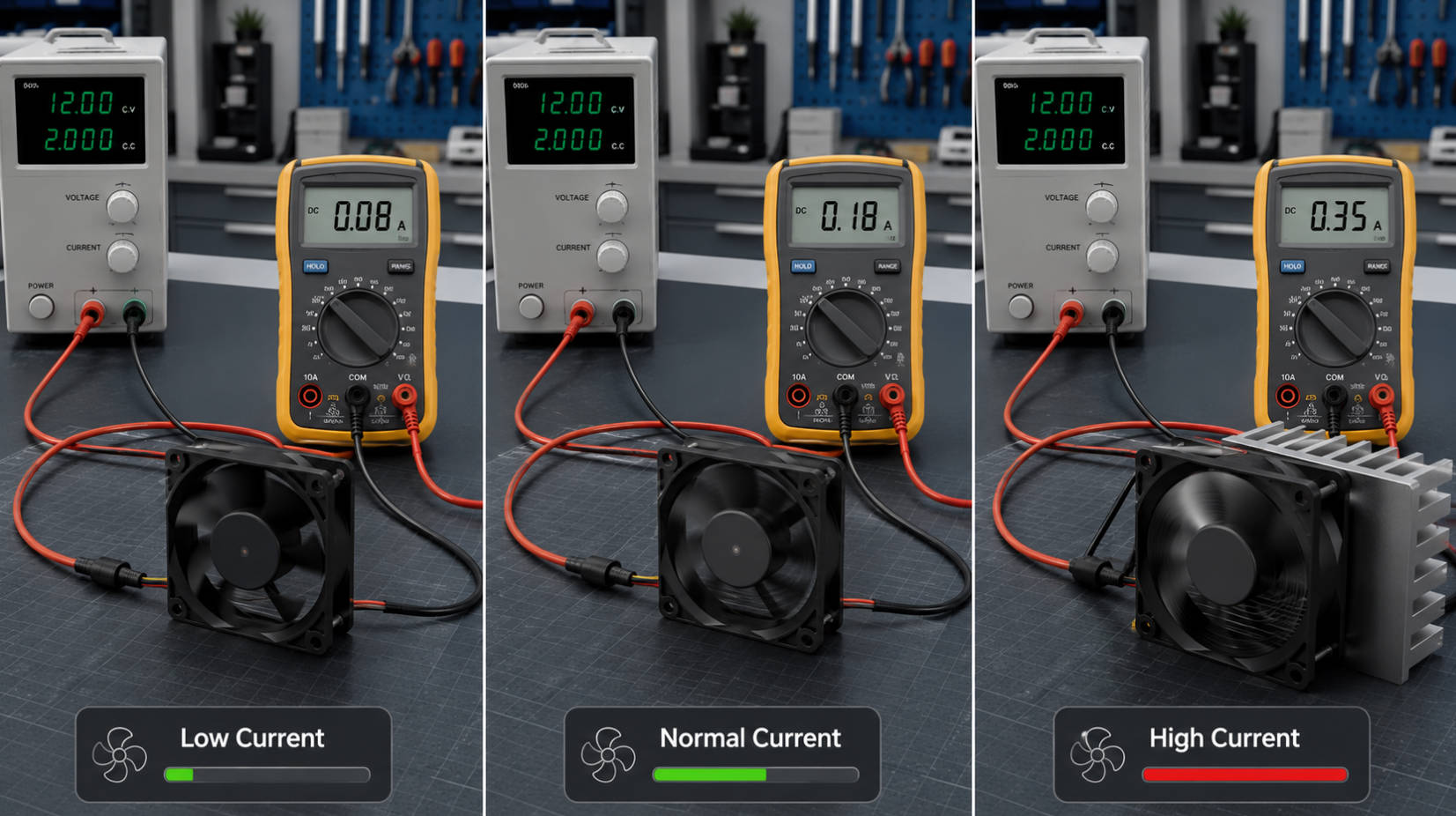
Current measurement gives much deeper insight than a spin test alone. A healthy fan typically draws a current that matches its design range; unusually high current often suggests friction, bearing wear, or internal shorting, while unusually low current may indicate a weak supply or open winding.
To measure current safely:
1. Set the multimeter to DC current mode.
2. Connect the meter in series with the fan.
3. Apply power and record the running current.
4. Compare the reading with the fan specification.
| Reading Pattern | Likely Cause | Recommended Action |
|---|---|---|
| Normal current, fan runs well | Fan is likely healthy | No action needed |
| High current, fan noisy or slow | Bearing wear, drag, or overload | Inspect or replace fan |
| Very low or zero current | Open circuit, bad wiring, or dead fan | Check wiring and fan continuity |
| Current spikes or fluctuates | Controller issue or unstable supply | Test with direct 12V source |
A current test is especially useful in production and maintenance environments because it helps detect early-stage degradation before the fan fails completely.
If the fan receives correct voltage but still performs poorly, inspect the mechanical side. Dust buildup, shaft friction, loose mounts, and blocked airflow can all reduce fan performance.
Check for:
- Debris on blades.
- Obstructed intake or exhaust paths.
- Loose screws or vibration mounts.
- Grinding noise from bearings.
- Blade cracks, bending, or imbalance.
If the fan spins freely by hand when unpowered but becomes noisy when running, the problem may be dynamic balance, bearing wear, or resonance from installation.

For 3-wire and 4-wire fans, the tach signal can help confirm whether the fan is actually rotating at the expected speed. In many fans, the tach output generates pulses proportional to shaft rotation, which can be read by a controller, multimeter with frequency mode, or oscilloscope.
If the fan spins but no tach signal appears, the fan may have a sensor fault, wiring issue, or controller mismatch. In industrial systems, a missing tach signal can trigger alarms even when airflow seems normal.
A fan may pass a bench test and still fail in the system. That is why system-level testing matters, especially when PWM control, temperature feedback, or protective circuitry is involved.
If the fan works on direct 12V power but fails in the device, check:
- Controller output.
- Wiring harness continuity.
- Connector contact quality.
- PWM compatibility.
- Thermal protection logic.
This approach helps isolate whether the failure is in the fan or in the surrounding electronics.
| Symptom | Most Likely Cause | Best Next Test |
|---|---|---|
| Fan does not start | No power, reverse polarity, dead motor | Check supply voltage and polarity |
| Fan starts then stops | Weak supply, controller fault, overheating | Test direct 12V input |
| Fan is noisy | Bearing wear, dust, blade damage | Inspect mechanically |
| Fan runs slowly | Low voltage, overload, friction | Measure voltage and current |
| Fan has no tach output | Sensor fault, wiring problem | Check signal pin and controller |
| Fan draws high current | Seized rotor, internal short | Stop use and replace fan |
This kind of table improves UX because it helps readers move from symptom to diagnosis quickly, which is especially important for maintenance teams and procurement buyers.
From a manufacturing and systems perspective, fan testing should never rely on a single symptom. The strongest diagnosis comes from combining voltage, current, noise, and airflow observations with the product datasheet.
Three practical tips:
1. Always compare the test result with the fan's rated specification.
2. Test the fan both on the bench and inside the real equipment.
3. Replace the fan if current is abnormal, noise is increasing, or startup is inconsistent.
For industrial users, these habits reduce repeat failures and prevent unnecessary service calls.
Replace the fan if any of the following are true:
- It does not start at the correct voltage.
- It draws abnormal current.
- It makes persistent bearing noise.
- It has blade damage or severe vibration.
- It fails tach or speed-control verification.
A fan that appears to work but has unstable current or intermittent startup is often in the early stage of failure, so delaying replacement can increase thermal risk.
If you need a reliable 12V DC fan testing method, or if you are sourcing high-quality cooling solutions for industrial, telecom, or export applications, contact Capital Technology Co., Limited for technical support and product selection guidance. Our team can help you match the right DC fan, verify performance requirements, and reduce thermal failure risk.
Measure the supply voltage first, then test current in series and confirm that the fan receives the correct polarity.
The most common causes are low voltage, dust buildup, worn bearings, or an overloaded controller.
Yes. A fan can spin but still draw abnormal current, make noise, or fail to deliver enough airflow.
The tach signal reports fan speed to the controller, which helps monitor rotation and detect failure.
If the noise is persistent, increasing, or paired with vibration or high current, replacement is the safest choice.
Yes, a regulated 12V battery or power source can be used for a basic spin test, as long as polarity is correct and the test is brief.
1. YouTube. "12V DC Exhaust Cooling Fan Testing | 150mA Current Test ..." [https://www.youtube.com/watch?v=YlTv8OFt368] [youtube]
2. Fansco. "Common Faults and Solutions of DC Fans" [https://www.fansco.com/news/common-faults-and-solutions-of-dc-fans/] [fansco]
3. Arma. "DC FAN MOTOR TESTING" [https://www.arma.org.au/wp-content/uploads/2017/02/FAN-MOTOR-TESTING.pdf] [arma.org]
4. MinebeaMitsumi. "DC Fan Sensors(DC fan motors) | Engineering Information" [https://product.minebeamitsumi.com/en/technology/fanmotor/dc_cat_001-03.html] [product.minebeamitsumi]
5. SUSO Digital. "How to Use Query Fan-Out for Your AI SEO Strategy" [https://susodigital.com/thoughts/what-query-fan-out-means-for-your-seo/] [susodigital]
6. Creative Works. "The Fan Out Effect: AI SEO Strategy for Answer Engines" [https://creativeworks.us/the-fan-out-effect-why-your-seo-strategy-is-obsolete-and-how-to-fix-it/] [creativeworks]
7. Momentic Marketing. "EEAT & SEO: How to Make Your Content More Helpful" [https://momenticmarketing.com/blog/seo-for-eat-guidelines] [momenticmarketing]


