From idea to market-ready product, our NPI solutions make every stage easier, faster. Discover How We Help
Help Center

Views: 276 Author: Capital Technology Publish Time: 2026-09-02 Origin: Site
Content Menu
● Why Is Your DC Fan Making Noise?
>> Aerodynamic Noise: Airflow Restriction and Turbulence
>> Mechanical Noise: Bearings, Balance, and Wear
>> Structural Noise: When the Enclosure Becomes a Speaker
● Step 1: Select the Right Bearing for a Quiet DC Cooling Fan
>> When Sleeve Bearings Make Sense
>> Why Ball Bearings Are Common in Industrial Equipment
>> When to Specify FDB or Advanced Bearing Designs
● Step 2: Use PWM Speed Control Correctly
>> Build a Temperature-Based Fan Curve
>> Avoid These PWM Noise Problems
● Step 3: Improve Airflow Before Increasing Fan Speed
>> Create a Clear Airflow Path
>> Select for Static Pressure, Not Only Airflow
>> Reduce Blade-Passing and Obstruction Noise
● Step 4: Isolate Vibration With Better Fan Mounting
>> Recommended Fan Mounting Methods
>> Check the Enclosure, Not Just the Fan
● Step 5: Maintain the Fan and Diagnose Noise Early
>> DC Fan Noise Inspection Checklist
● A Practical Quiet-Fan Design Example
● Choose a DC Fan Supplier That Understands the System
● FAQ
>> 1. Why does my DC fan become louder over time?
>> 2. Does lowering DC fan RPM always reduce noise?
>> 3. Is a ball-bearing DC fan quieter than a sleeve-bearing fan?
>> 4. What PWM frequency should I use for a 4-wire DC fan?
>> 5. Can rubber mounts make a DC cooling fan quieter?
>> 6. Why is my fan noisy only after installation in a cabinet?
>> 7. Should I choose a larger fan to reduce noise?
A noisy DC fan is rarely "just a fan problem." In most electronics, telecom cabinets, medical devices, industrial controls, and communication equipment, fan noise is the result of an interaction between the fan, airflow path, mounting structure, control method, and operating environment.
For product engineers and purchasing teams, the goal is not simply to select the lowest-dB DC cooling fan. The real objective is to achieve the required thermal performance at the lowest practical noise level throughout the product's service life. This guide explains how to make a DC fan quieter through better fan selection, PWM speed control, airflow optimization, vibration isolation, and preventive maintenance.
At Capital Technology Co., Limited, we work with DC fan applications where cooling reliability and acoustic performance must coexist. As a cooling-solution manufacturer with the independent CAPITAL brand and a leading SANYO DENKI distributor, we understand that quiet cooling must be designed into the complete system—not added as an afterthought.
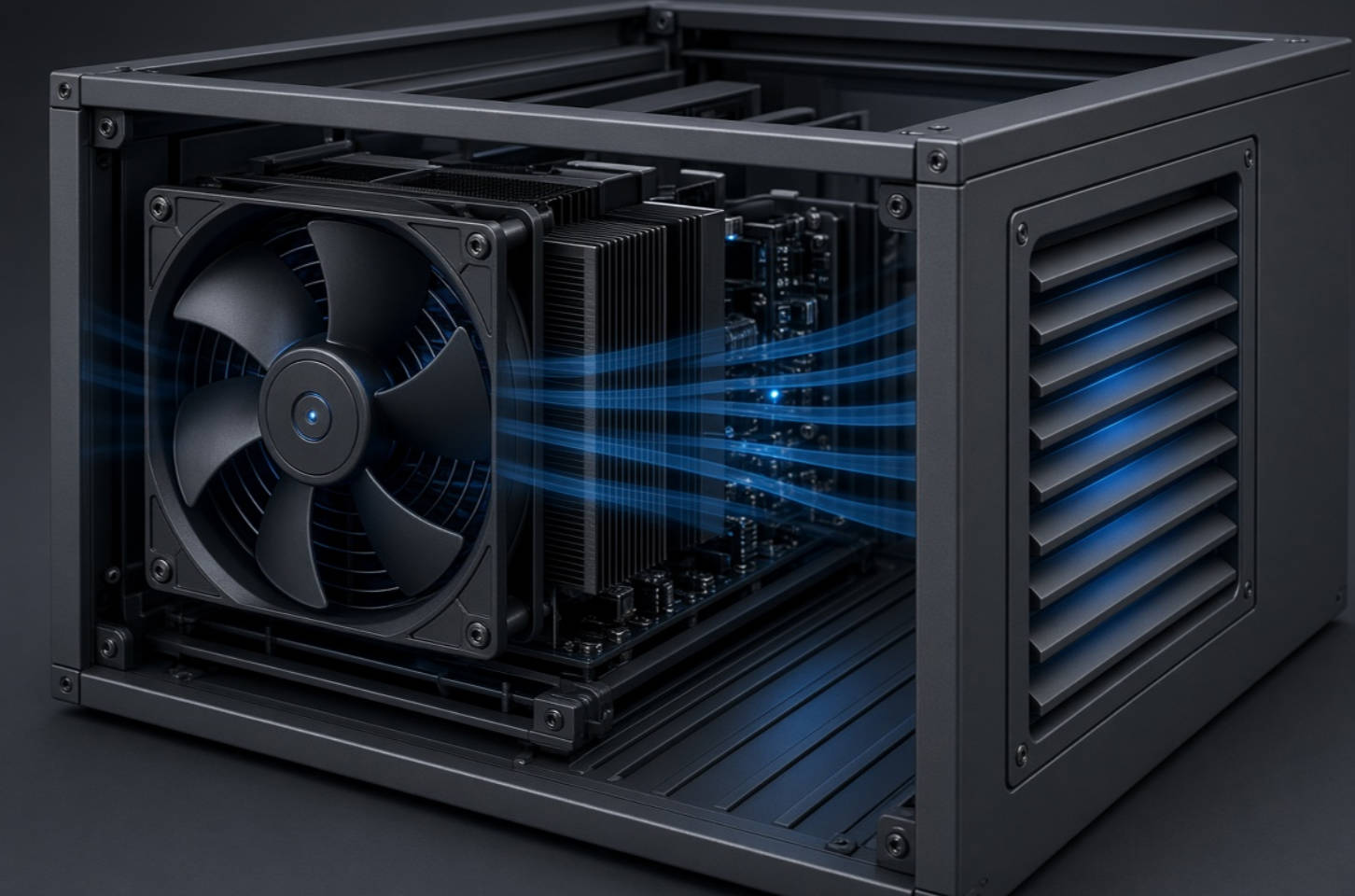
Before attempting to reduce noise, identify the type of sound you hear. A high-pitched whine, low-frequency hum, rattling noise, clicking sound, or rushing-air sound may have completely different causes.
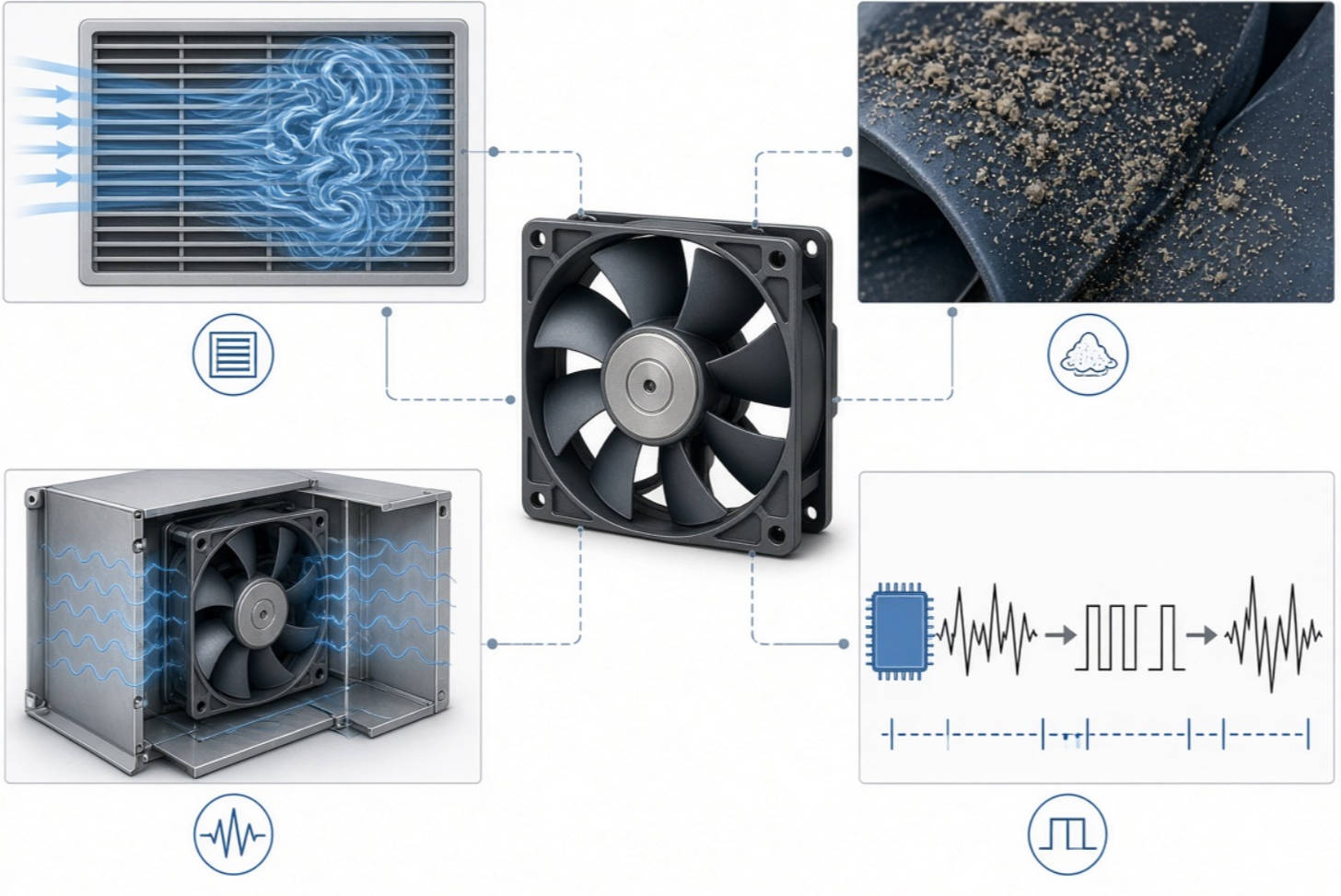
In practical DC cooling fan projects, noise usually comes from five major sources:
- Aerodynamic noise caused by turbulent airflow, blocked intake paths, restrictive grilles, sharp bends, or insufficient clearance around the fan.
- Mechanical noise caused by bearing wear, shaft friction, rotor imbalance, or damaged blades.
- Structural vibration transferred from the fan frame into a metal chassis, plastic housing, panel, or enclosure.
- Electrical or PWM-related noise caused by an incompatible speed-control signal, audible switching frequency, or unstable duty-cycle changes.
- Maintenance-related noise caused by dust accumulation, contamination, loose fasteners, or foreign objects contacting the blades.
A useful first rule is simple: do not replace a fan until you know what is making the noise. A new fan installed in the same restrictive enclosure may still be loud because the system, not the fan, is the main acoustic problem.
Airflow noise becomes more noticeable as fan speed rises. It is often described as a whooshing, hissing, or rushing sound. In many products, the fan itself is operating normally, but the surrounding design creates turbulence.
Common airflow restrictions include:
- Fan guards with a dense wire pattern
- Dust filters that are too fine or overdue for cleaning
- Intake and exhaust openings that are too small
- Components placed too close to the fan inlet or outlet
- Sharp-edged cutouts in sheet metal
- Cable bundles located directly in the airflow path
- Heat sinks, boards, and power modules that create excessive system resistance
A DC axial fan delivers airflow according to its performance curve. As static pressure rises inside an enclosure, the actual airflow may fall while turbulence and acoustic noise increase. This is why selecting a fan only by free-air CFM can be misleading. The fan must be matched to the real operating impedance of the equipment.
Mechanical fan noise typically sounds like grinding, ticking, buzzing, scraping, or intermittent rattling. It may become worse after long operating hours, high ambient temperature exposure, or operation in dusty and humid environments.
The most common mechanical causes are:
- Bearing lubricant degradation
- Bearing contamination by dust or moisture
- Shaft wear or rotor misalignment
- Blade deformation after handling or impact
- Dust deposits causing rotor imbalance
- Loose fan labels, wires, or objects touching the impeller
- A cracked fan frame or damaged mounting point
A fan may be quiet during initial testing but become noisy months later if the bearing design is not appropriate for the temperature, orientation, duty cycle, and contamination level of the final application.
A small vibration at the fan frame can become a much larger sound after it enters a metal panel or plastic housing. Thin sheet-metal cabinets are especially likely to amplify vibration.
This is often the reason a fan seems quiet when tested on a workbench but becomes noisy after installation.
Signs of structural vibration include:
- A low-frequency hum that changes when you press the enclosure
- Rattling that disappears when mounting screws are loosened or tightened
- A noticeable noise increase after the fan is installed in a cabinet
- Different sound levels between identical fans mounted in different positions
The solution is usually not more fan speed. It is better vibration isolation, mounting stiffness, and enclosure design.
Bearing choice strongly affects both initial noise and long-term acoustic stability. A low-cost fan may appear quiet when new, but its noise level can rise as lubricant ages or contamination enters the bearing system.
| Bearing Type | Initial Noise | Service-Life Potential | Orientation Tolerance | Best-Fit Applications |
|---|---|---|---|---|
| Sleeve bearing | Low | Moderate to limited | More sensitive | Cost-sensitive, intermittent-duty electronics |
| Ball bearing | Moderate | High | Strong | Industrial, telecom, network, and continuous-duty equipment |
| Fluid dynamic bearing | Very low | High to very high | Good | Noise-sensitive electronics, premium systems, medical equipment |
Sleeve-bearing DC fans can offer low initial noise and an attractive cost. They are often suitable for applications with moderate temperatures, relatively clean air, shorter duty cycles, and a controlled installation orientation.
However, they are less ideal when the product runs continuously, experiences high temperatures, or operates in vertical mounting positions. Over time, lubricant migration, evaporation, or contamination can increase friction and create noise.
Ball-bearing fans are widely used in telecom equipment, industrial control cabinets, power systems, network devices, and other demanding applications because they generally tolerate long operating hours and multiple mounting orientations.
They may produce more mechanical sound than a new sleeve-bearing model, but they often provide a better long-term reliability profile in harsh duty cycles. For equipment where unexpected fan failure can cause thermal shutdown, service interruption, or field-maintenance costs, that trade-off can be justified.
Fluid dynamic bearing designs use a lubricating film to stabilize rotating components and reduce direct mechanical contact. They are a strong option when the application requires both quiet operation and long-term smoothness.
Consider FDB or another advanced bearing solution when the product is used in:
- Medical and laboratory equipment
- Premium consumer electronics
- Office equipment located close to users
- Audio, broadcast, and professional AV systems
- Compact devices with low background noise
- High-value systems where acoustic complaints can damage product perception
Expert recommendation: Specify the bearing type based on the required lifetime, operating temperature, mounting orientation, and maintenance conditions—not merely on the fan's purchase price.
One of the most effective ways to make a DC fan quieter is to avoid operating it at full speed when full cooling is not needed.
A fan running at maximum RPM all the time creates unnecessary acoustic load, energy use, and mechanical wear. Intelligent speed control allows the fan to operate at a lower speed during normal thermal conditions and increase output only when temperatures rise.
For many 4-wire fan interfaces, a PWM control frequency near 25 kHz is commonly used because it is above the nominal audible range for most people. However, engineers should always verify the specific fan's datasheet and control requirements before finalizing the electrical design.
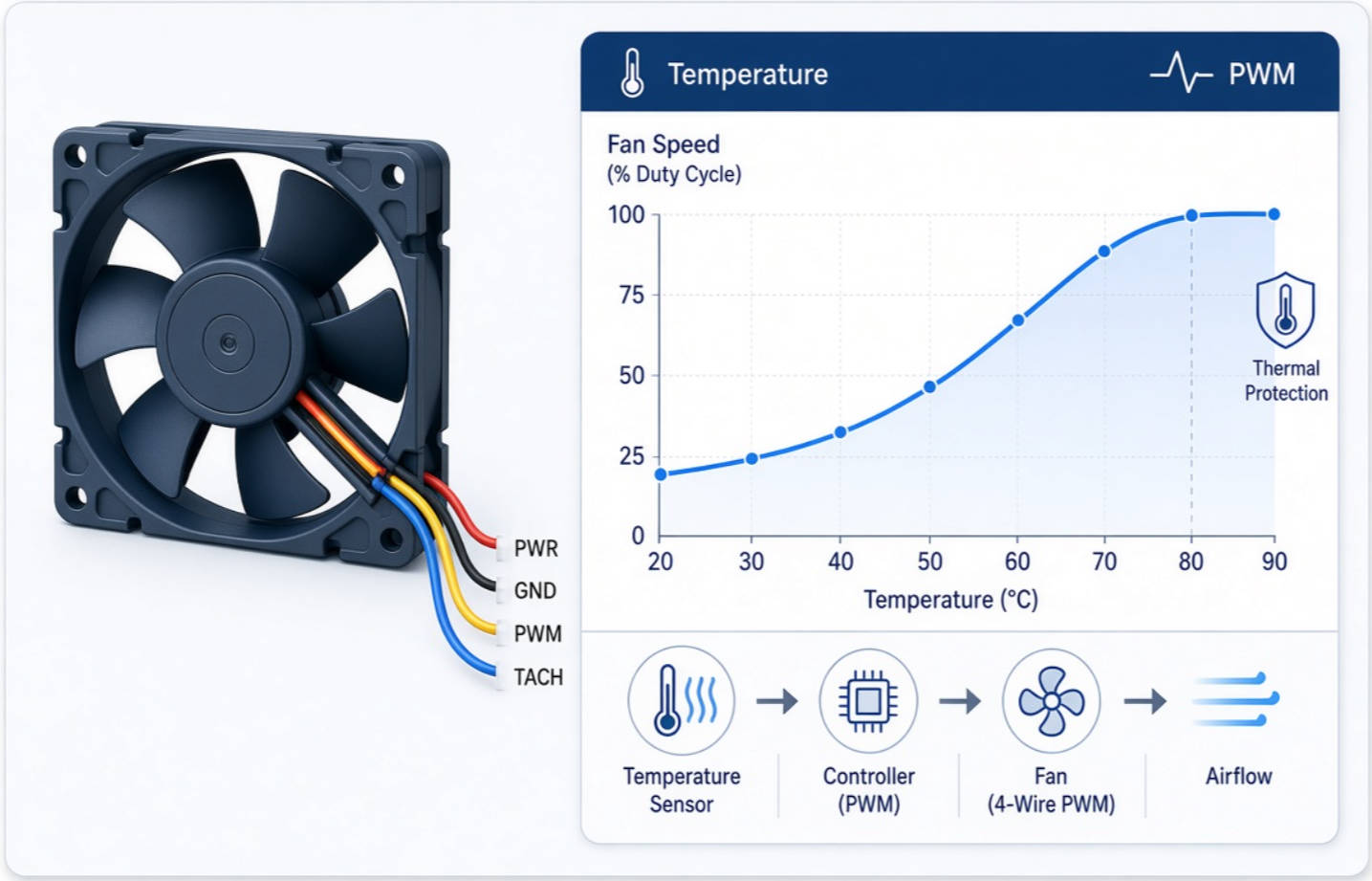
A practical fan-control strategy should use a gradual temperature curve rather than abrupt on/off operation.
For example:
| System Temperature | Suggested Fan Command | Purpose |
|---|---|---|
| Below 35°C | Minimum stable duty cycle | Maintain low background noise |
| 35–45°C | Gradual speed increase | Balance cooling and acoustics |
| 45–55°C | Medium-to-high fan speed | Protect thermal margin |
| Above 55°C | Maximum required fan speed | Prioritize system reliability |
The exact temperature thresholds depend on component ratings, airflow path, ambient conditions, and the thermal sensitivity of the product. A telecom power module and a consumer router should not necessarily use the same curve.
Poor PWM implementation can create audible tones, unstable speed behavior, or repeated ramping noise. To prevent this:
1. Use a compatible 4-wire PWM fan when independent speed control is required.
2. Confirm that the controller output type matches the fan's signal requirements.
3. Keep PWM frequency within the fan manufacturer's recommended range.
4. Avoid large, rapid duty-cycle changes that make the fan repeatedly surge or hunt.
5. Add temperature hysteresis so the fan does not continuously speed up and slow down around one threshold.
6. Validate acoustic behavior in the final enclosure, not only in open-air testing.
A common mistake is setting the minimum PWM duty cycle too low. Some fans cannot maintain stable rotation below a certain duty cycle, which can cause clicking, repeated startup attempts, or unstable RPM. The correct minimum setting should be established through actual testing with the selected fan model.
Increasing fan RPM is the fastest way to gain more cooling, but it is often the worst first choice for noise-sensitive equipment. Better airflow design can reduce thermal resistance without requiring a louder fan.
The best airflow path is usually short, direct, and free from sudden restrictions. Air should enter through a sufficiently sized inlet, pass through heat-generating components, and exit with minimal recirculation.
Review the system for the following issues:
- Is the fan inlet too close to a wall, panel, or cable bundle?
- Is the outlet area smaller than the inlet area?
- Is hot exhaust air being drawn back into the fan inlet?
- Are heat-producing components outside the main airflow path?
- Does the grille create a sharp pressure drop?
- Is the dust filter appropriate for the expected environment?
In compact designs, even a small change in grille geometry or fan clearance can improve both airflow and perceived noise.
Free-air airflow ratings are useful, but they do not tell the whole story. Once a fan is installed behind filters, grilles, heat sinks, ducts, and components, it must overcome static pressure.
For restrictive designs, a higher-static-pressure fan may be quieter overall than a standard axial fan forced to operate at a higher RPM. Fan manufacturers publish performance curves that show the relationship between airflow and pressure. These curves should be reviewed alongside the system resistance curve during product development.
Engineering references from fan manufacturers also emphasize the importance of pressure management, thermal design, acoustic evaluation, and fan selection as a combined system task.
The sound of a fan is affected by blade geometry, blade count, rotational speed, and nearby obstructions. When blades pass close to a grille, heat sink, or panel edge, the interaction can create tonal noise.
To reduce this risk:
- Maintain adequate clearance around the intake and exhaust sides.
- Avoid placing a restrictive grille immediately against the fan blades.
- Use smooth, rounded openings where possible.
- Keep wiring away from the inlet and outlet.
- Select fan designs engineered for the required pressure range.
- Test alternative grille patterns during prototype evaluation.
Fan noise often includes tonal components related to blade number and rotational speed. Advanced fan design can reduce these peaks through blade geometry and spacing optimization.
Even an excellent low-noise DC fan can become loud if it is mounted directly onto a resonant enclosure.
Use vibration isolation when the product has thin metal panels, lightweight plastic structures, large flat covers, or noise-sensitive installation conditions.
- Rubber grommets: Suitable for many axial fan installations and effective at reducing vibration transfer.
- Silicone fan mounts: Useful for lightweight consumer devices and low-to-medium-load fans.
- Foam or elastomer pads: Helpful between the fan frame and mounting surface when correctly selected for temperature and compression.
- Isolated fan brackets: Recommended for larger fans, cabinets, or industrial equipment with significant structural resonance.
- Proper screw torque: Important because overtightening can bypass the isolation material and restore the vibration path.
Do not use soft mounting materials that block intake openings, deform excessively at operating temperature, or allow the fan to move into contact with nearby components.
During acoustic testing, compare these conditions:
1. Fan running in free air.
2. Fan mounted in the final enclosure.
3. Fan mounted with vibration-isolation hardware.
4. Fan running with the actual grille, filter, and internal components installed.
5. Fan operating at multiple PWM duty cycles.
This comparison reveals whether the dominant problem is fan noise, airflow noise, or structural amplification.
For repeatable fan acoustic measurements, AMCA publishes recognized reverberation-room methods for sound testing of fans under ANSI/AMCA Standard 300-24.
Routine maintenance is one of the lowest-cost ways to prevent DC fan noise from becoming a reliability issue. Dust accumulation changes blade aerodynamics, adds imbalance, restricts airflow, and can contribute to bearing contamination.
- Inspect the blades for dust buildup, cracks, and deformation.
- Check that labels, wires, and foreign objects cannot touch the impeller.
- Clean filters and intake grilles at defined intervals.
- Confirm mounting screws and brackets are secure.
- Look for signs of bearing noise, such as grinding or irregular startup.
- Record fan RPM and system temperature where monitoring is available.
- Replace fans that show repeatable mechanical noise or unstable speed behavior.
Never clean a fan by forcing it to spin at excessive speed with high-pressure air. This can damage the bearing system or generate voltage through the motor circuit. When compressed air is used, hold the rotor still and follow the equipment's maintenance procedures.
Consider a compact telecom enclosure with a 24 VDC axial fan running continuously. The system passes thermal testing, but customers report a noticeable whine and cabinet hum.
A better solution may include:
- Replacing fixed full-speed operation with a temperature-based PWM curve.
- Verifying the PWM signal is compatible with the selected fan.
- Increasing clearance between the intake grille and fan inlet.
- Selecting a fan with suitable static-pressure capability for the filter and internal layout.
- Adding silicone or rubber isolation between the fan frame and cabinet.
- Choosing a long-life bearing solution suitable for continuous operation.
- Testing acoustics with the final enclosure fully assembled.
The result is not necessarily the lowest-RPM fan. It is a cooling system that provides the correct airflow when needed while remaining quieter during normal operation.

Making a DC fan quieter requires more than comparing a single noise rating. It requires understanding application temperature, system resistance, enclosure resonance, operating voltage, control signal, airflow direction, mounting method, service life, and environmental conditions.
Capital Technology Co., Limited provides cooling solutions centered on CAPITAL DC fans and SANYO DENKI fan products. Whether you are developing telecom hardware, industrial electronics, communication equipment, power systems, medical devices, or custom cooling assemblies, our team can help evaluate the factors that affect airflow, static pressure, reliability, and acoustic performance.
Contact Capital Technology today to discuss your application requirements, including fan dimensions, voltage, airflow, static pressure, RPM, noise target, bearing type, operating temperature, control method, and expected service life. A properly matched cooling solution can help reduce fan noise without compromising thermal safety.
DC fans often become louder because of dust accumulation, lubricant degradation, bearing wear, rotor imbalance, or vibration transferred into the enclosure. A fan that is quiet when new may become noisy if its bearing type is not suitable for the operating environment.
In most cases, yes. Lower RPM generally reduces aerodynamic and mechanical noise. However, lowering speed too much can reduce cooling performance and may cause unstable operation if the fan cannot maintain rotation at the selected PWM duty cycle.
Not always. Sleeve-bearing fans can be very quiet initially, while ball-bearing fans are often selected for durability and orientation flexibility. For very low-noise, long-life applications, fluid dynamic bearing designs may be a better option.
Many 4-wire PWM fan designs use a control frequency around 25 kHz, which is commonly above the audible range. However, always follow the selected fan's datasheet because acceptable PWM frequency and signal characteristics can vary by model.
Yes. Rubber grommets, silicone mounts, and other isolation materials can reduce the transfer of fan vibration into a chassis or enclosure. They are especially effective when thin metal panels or plastic housings amplify low-frequency vibration.
The cabinet may be creating airflow restriction or acting as a resonator. Check grille design, inlet clearance, structural vibration, mounting torque, dust filters, cable routing, and possible hot-air recirculation.
Often, a larger fan running at a lower RPM can produce the required airflow with less noise than a smaller fan running at high speed. However, the final decision should account for available space, static-pressure requirements, enclosure design, voltage, and reliability targets.
1. Capital Technology Co., Limited. “[How to Make a DC Fan Quieter?](https://www.yccfan.com/articledetail/how-to-make-a-dc-fan-quieter.html)” Accessed September 2, 2026.
2. Air Movement and Control Association International. “[AMCA Updates Fan Sound-Testing Standard 300](https://www.amca.org/news/press-releases/amca-updates-fan-sound-testing-standard-300.html).” July 29, 2024.
3. Air Movement and Control Association International. “[Basics of Fan Noise](https://www.amca.org/assets/resources/public/assets/uploads/FINAL-_AMCA_Fan_Noise_RG.pdf).”
4. NMB Technologies. “[Fan Engineering Handbook](https://nmbtc.com/resources/fan-engineering/).” August 23, 2022.
5. NIDEC Corporation. “[Air-Cooling Fan That Responds to Thermal Migration](https://www.nidec.com/en/technology/casestudy/cooling-fan/).”
6. NIDEC Corporation. “[Pushing the Limits of Miniaturization With Our Ultra-Thin Fan Technology](https://www.nidec.com/en/technology/casestudy/uff/).”
7. Farnell. “[4-Wire PWM Fan Datasheet](https://www.farnell.com/datasheets/2762426.pdf).” Includes a 12 VDC four-wire interface based on Intel specifications and a 25 kHz PWM reference.
8. Intel. “[4-Wire Pulse Width Modulation Controlled Fans Specification](https://microdiypro.com/intel-4-wire-pwm-fan-specification-25khz-open-collector/).” Secondary summary of Intel’s Revision 1.3 interface guidance.


