From idea to market-ready product, our NPI solutions make every stage easier, faster. Discover How We Help
Help Center

Views: 237 Author: Capital Technology Publish Time: 2026-09-27 Origin: Site
Content Menu
● Fan Airflow and Static Pressure: What Do the Ratings Mean?
● How Does a Fan P–Q Curve Reveal Actual Airflow?
>> What Moves the Operating Point?
● How Much Airflow Does Your Electronics Enclosure Need?
>> Worked Example: A 120 W Control Enclosure
● Why Do Installed Fans Underperform Their Datasheets?
● DC Fan vs. AC Fan: Which Selection Factors Matter?
● When Should You Use Fans in Series or Parallel?
● How Does Fan Speed Affect Pressure and Noise?
● A Practical Fan Selection and Validation Workflow
>> What to Send a Fan Supplier
● Request an Application-Specific Cooling Review
● FAQ: Fan Airflow and Static Pressure
>> 1. Is higher static pressure always better for electronics cooling?
>> 2. Can I calculate installed airflow from maximum CFM alone?
>> 3. Does adding a second fan double cooling performance?
>> 4. What is the difference between airflow and static pressure?
>> 5. How do I estimate airflow for a 120 W enclosure?
>> 6. Should I choose a DC fan or an AC fan for a restrictive enclosure?
>> 7. Why might a fan pass a bench test but fail in the finished product?
A cooling fan can look ideal on a datasheet and still leave a power supply, telecom module, or server board too hot. The missing link is often fan airflow vs. static pressure: airflow describes how much air moves, while static pressure describes the fan's ability to move it against resistance. For a DC fan or AC fan, the specification that matters most is not its headline maximum airflow. It is the airflow delivered after the fan is installed in your actual enclosure.
This guide explains how to read a fan P–Q curve, estimate the airflow your electronics need, and test whether a candidate fan can deliver it. It also covers the placement and validation decisions that can turn a promising catalog selection into a reliable cooling solution.

Airflow is the volume of air moved per unit of time. Fan datasheets commonly express it in cubic feet per minute (CFM) or cubic meters per minute (m³/min). Static pressure describes the pressure available to overcome airflow resistance; it is commonly expressed in pascals (Pa) or inches of water gauge (in. H₂O).
Two prominent catalog values describe opposite test conditions:
- Maximum airflow: Flow measured when the fan faces minimal external resistance.
- Maximum static pressure: Pressure measured at or near zero airflow, with the flow path blocked.
Neither endpoint normally represents the operating condition inside equipment. A filter, guard, heat sink, narrow intake, wiring bundle, or exhaust grille adds resistance. Therefore, comparing candidates by maximum CFM alone can favor a fan that performs poorly where your equipment actually operates.
Static pressure is not a second, independent measure of cooling. A fan must deliver enough airflow at the pressure required by the system. At the blocked-flow endpoint, for example, the pressure may be high, but virtually no air is carrying heat away.
A fan's airflow–static pressure curve, also called a P–Q curve, plots available pressure against airflow at specified operating conditions. The horizontal axis shows airflow; the vertical axis shows pressure. At one end is the maximum-airflow, low-resistance condition. At the other is the near-zero-flow, maximum-pressure condition.
Your equipment has a separate system resistance curve. As airflow increases, pressure losses through many common restrictions tend to rise roughly with the square of flow. The crossing of the fan curve and system curve is the operating point: the pressure and airflow the assembled system can achieve under those conditions.
Imagine two fans both advertise 80 CFM of maximum airflow. At the pressure imposed by a dense filter and compact heat sink, Fan A may deliver 42 CFM and Fan B 56 CFM. These are illustrative values, not product test results. The lesson is that the fan with the better installed operating point—not necessarily the better free-air number—is the stronger candidate.
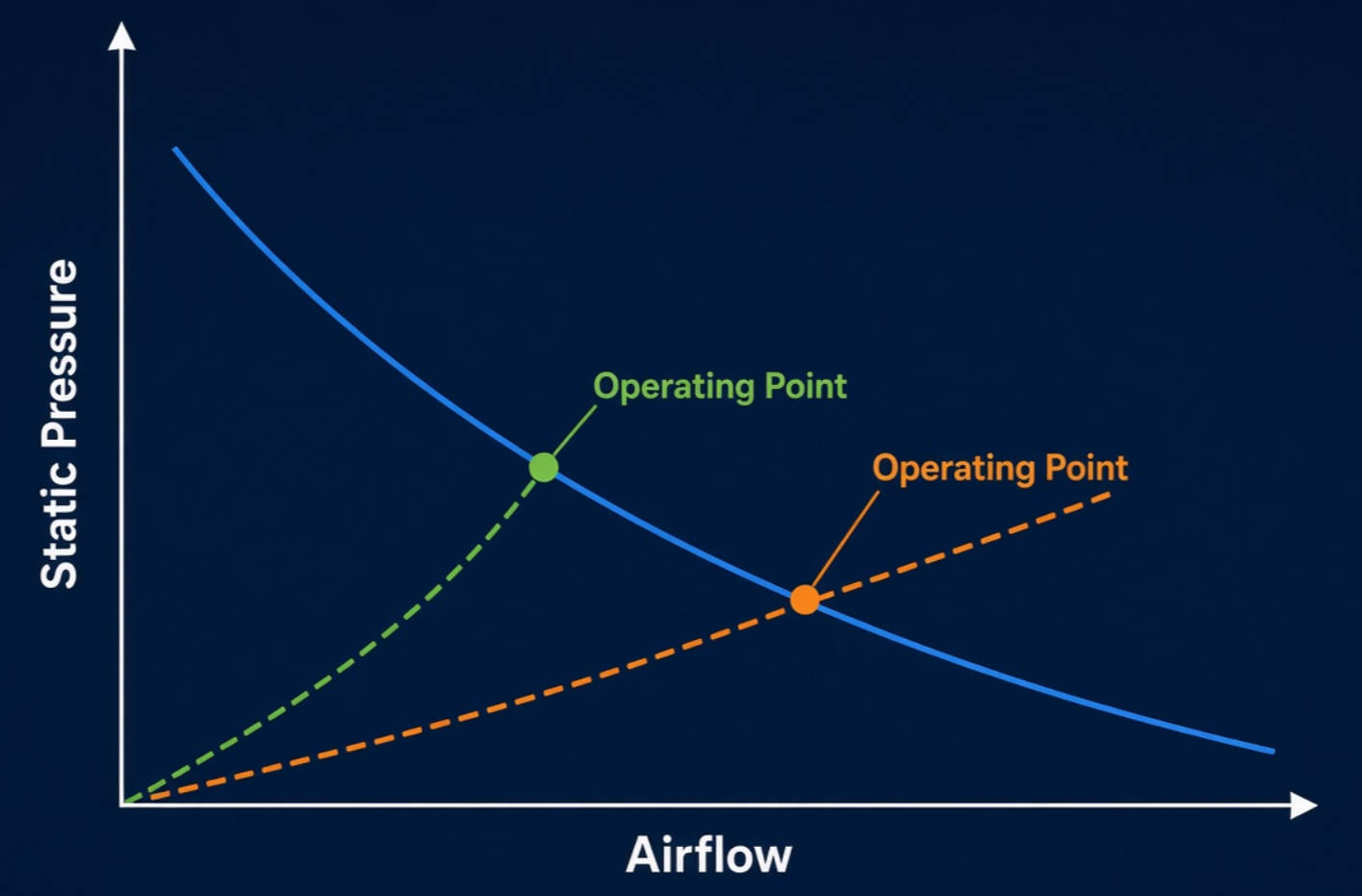
A filter can load with dust. A revised PCB may obstruct an intake. A different fan speed shifts the available fan curve. Each change can move the operating point and alter component temperatures. Treat a published curve as a starting point, then verify it against the actual mechanical design and operating conditions.
Before browsing fan catalogs, define the heat load and allowable air-temperature rise. Count the power dissipated as heat inside the ventilated space, not automatically the full electrical input of every component. Define the rise as the allowable outlet-air temperature minus inlet-air temperature; do not confuse it with a semiconductor junction-to-ambient limit.
For a first-pass calculation when forced airflow removes approximately all the heat:
Required airflow (CFM) ≈ 1.76 × heat load (W) ÷ allowable air-temperature rise (°C).
This relation assumes approximately standard-density air. It estimates air moving through the intended cooling path, not a fan's free-air catalog rating. If enclosure-wall heat transfer, solar gain, altitude, leakage, or recirculation matters, refine the model and validate it experimentally.
Suppose electronics release 120 W into a ventilated enclosure. The maximum inlet-air temperature is 35°C, and the design permits a 10°C rise in the exhaust air. The initial target is 1.76 × 120 ÷ 10 ≈ 21 CFM of effective airflow.
This does not mean that any fan labeled "21 CFM" will work. Select candidates whose P–Q curves indicate at least that airflow at the enclosure's estimated pressure drop, then measure temperatures in a prototype. The outlet-air average can meet the target while a poorly washed component remains too hot. Keep component-specific thermal limits and airflow distribution in the acceptance test.
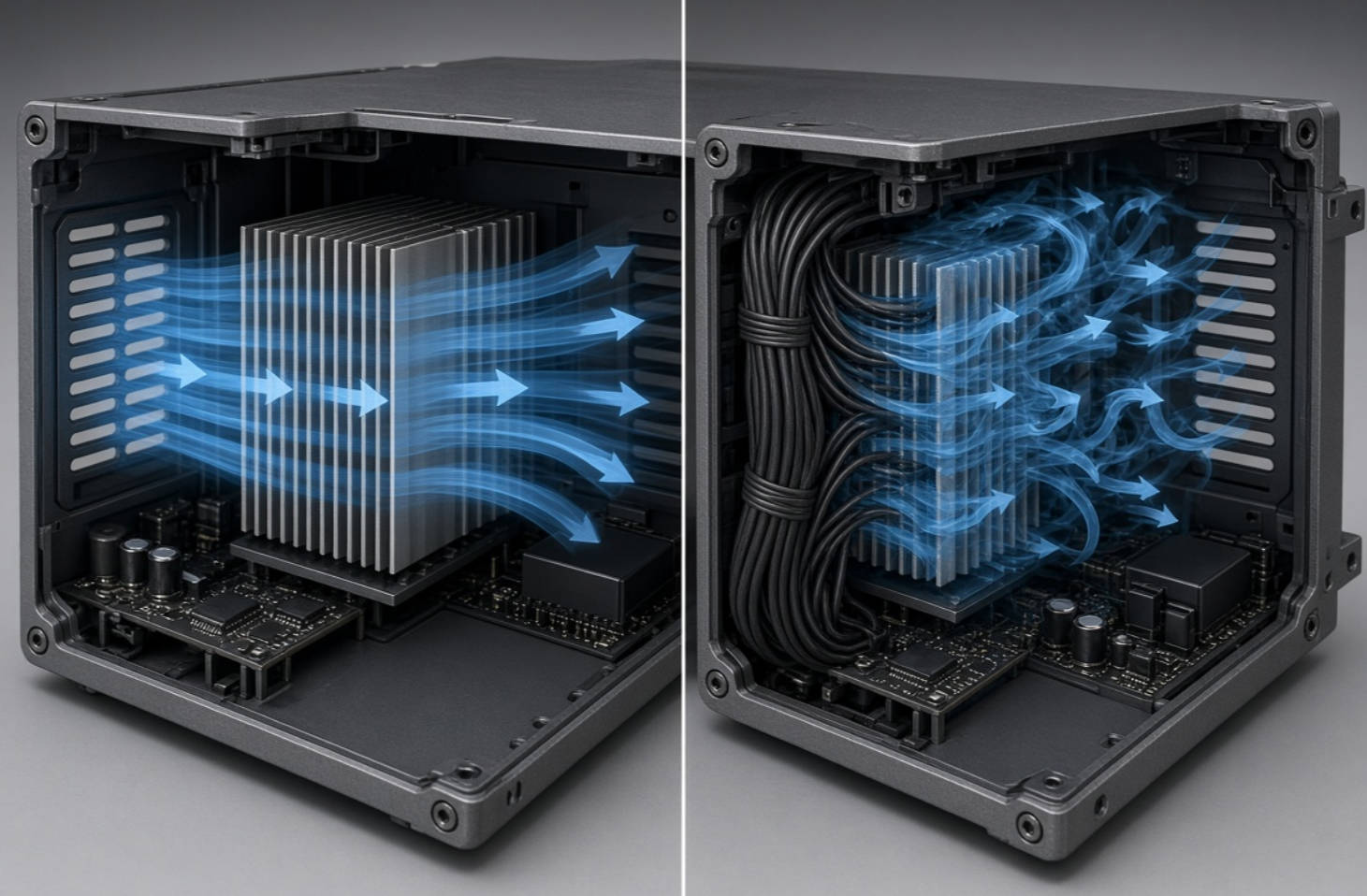
The enclosure is part of the cooling system. A narrow vent can restrict flow; a cable bundle may divert it; a grille positioned against a fan inlet can disturb the approaching air. A fan can also push air through an easy bypass instead of the critical heat sink. These problems are not captured by maximum-airflow ratings.
System effect describes additional fan-performance loss caused by installation conditions that differ from the test arrangement. It is especially important when obstructions sit immediately upstream or downstream of the fan. Adding an ordinary filter pressure drop to a spreadsheet may not fully represent the disturbance caused by a poorly positioned inlet or abrupt outlet.
A SANYO DENKI America study provides a useful model-specific example. In tests of its 36 × 36 × 28 mm San Ace 36 9HV type, a flat inlet obstruction at 10 mm noticeably reduced airflow performance, while distances of 15 mm or greater had negligible impact in the tested arrangements. That is evidence to review inlet clearance—not a universal 15 mm rule for every fan and enclosure. The study also found similar P–Q performance for its tested side-by-side parallel configurations across 0–35 mm fan spacing. Do not generalize either result beyond comparable layouts without testing.
For a practical layout review, check:
- Inlet clearance: Keep walls, cables, foam, and panels from crowding the fan opening.
- Complete flow path: Size both intake and exhaust paths; a generous inlet cannot compensate for a blocked outlet.
- Cooling coverage: Route air through the components that need it, rather than around them.
- Service condition: Consider how a loaded filter changes resistance over time.
The DC-versus-AC decision should follow your equipment's available power, control architecture, and operating environment. Neither motor category guarantees a better installed airflow result by itself. Compare actual candidate models at the required operating point, not broad labels.
| Design question | DC fan evaluation | AC fan evaluation |
|---|---|---|
| Power interface | Confirm supply voltage, operating range, startup behavior, and connector requirements. | Confirm rated supply, frequency, wiring, and installation requirements. |
| Speed and monitoring | Check the specific model's PWM, tachometer, or alarm options if your controller needs them. | Check the specific model's available control and status options rather than assuming they are present. |
| Thermal fit | Compare P–Q curves, power draw, noise, dimensions, and lifetime at the required duty point. | Apply the same installed-performance comparison at the required duty point. |
| Sourcing | Request the exact model, revision, accessories, and traceability documentation. | Request the same model-level documentation and installation details. |
For either type, check ambient-temperature limits, service life, acoustics, ingress or contamination exposure, and what happens after a fan fault. If an application requires redundancy or alarm reporting, specify those functions explicitly rather than expecting them from a generic fan category.
Series fans are arranged so air passes through one and then the other. In an idealized comparison of identical fans, the available pressures add at the same airflow. This may help when the system is highly restrictive. Parallel fans serve side-by-side paths; their airflows add at the same pressure in the idealized case. This may suit a wider, lower-resistance path or allow cooling of separate regions.
| Arrangement | Idealized curve effect | Main validation concern |
|---|---|---|
| Two identical fans in series | Approximately twice the pressure at a given flow. | Spacing, swirl, mismatch, and actual series curve. |
| Two identical fans in parallel | Approximately twice the flow at a given pressure. | Shared restriction, backflow, and uneven distribution. |
These relationships describe combined fan curves, not a promise to double installed pressure or airflow at the original operating point. The system curve still determines where the combination runs. Also consider whether one failed fan could impede the other or permit reverse flow. Check the manufacturer's combination guidance and test the complete assembly.
For a comparable fan geometry and air density, fan-law estimates indicate that airflow changes roughly in proportion to rotational speed and pressure capability roughly with its square. A simple illustration: increasing speed by 20% suggests about 20% more flow and about 44% more pressure capability at corresponding points on the curve. These are scaling estimates, not guaranteed installed outcomes.
Raising speed can help recover flow, but first inspect the restriction. An unnecessary obstruction may be cheaper to remove than to overcome continuously. Higher speed may also increase electrical demand and sound, while a different operating point can affect how useful the extra pressure is. Confirm the proposed speed within the model's rated limits and evaluate the finished system acoustically and thermally.
A defensible selection process combines a thermal estimate, model-specific performance data, and measurements. Use this sequence when qualifying a new enclosure or redesigning an existing one:
1. Define the design envelope. Record maximum inlet temperature, altitude if relevant, heat dissipation, allowable component temperatures, supply conditions, noise target, and packaging constraints.
2. Estimate effective airflow. Calculate a first-pass target from heat load and allowable air-temperature rise. Check whether heat sources or hotspots need dedicated flow.
3. Map the path. Document filters, vents, grilles, heat sinks, cable routing, and the expected clean-to-loaded filter condition.
4. Compare P–Q curves. Shortlist fans that can meet the target at estimated system resistance. Check voltage, dimensions, control signals, and sound data for each exact model.
5. Prototype the installed assembly. Measure airflow or system impedance where practicable. Log inlet, outlet, and critical-component temperatures at the most demanding realistic operating conditions.
6. Repeat after design changes. A new front panel, filter, board layout, or firmware speed setting can invalidate an earlier thermal pass.
If system impedance is not yet measurable, a catalog free-air-flow allowance can help with an initial shortlist, but it is not proof of installed performance. SANYO DENKI's selection guideline describes a rough shortlist using a fan rated around 1.5–2 times the needed operating airflow, then explicitly calls for an installation test. Use that range as a provisional screening aid, not as a universal design margin.
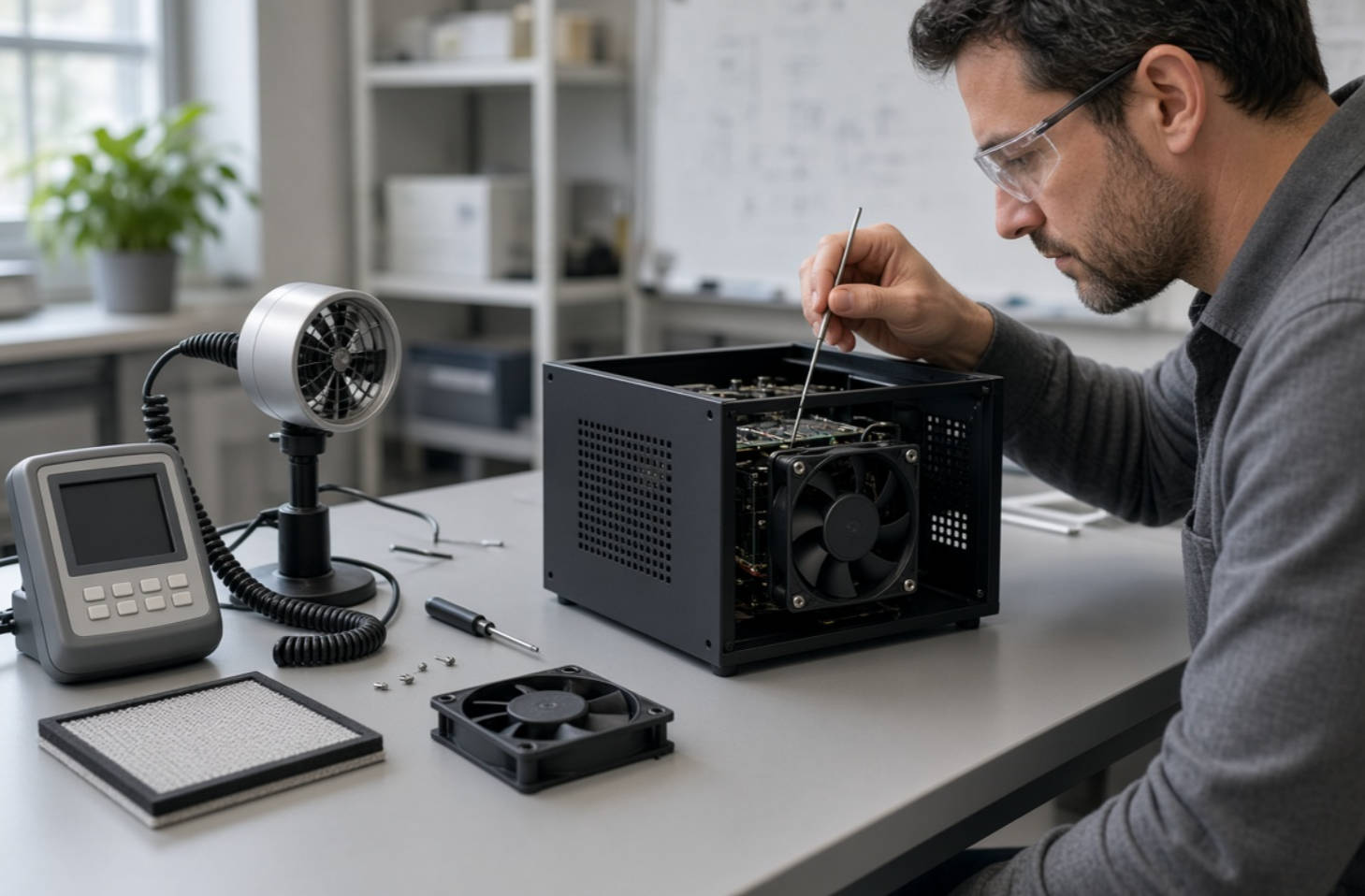
A useful RFQ should include the required airflow at pressure, not just maximum CFM. Attach the enclosure drawing, fan location, vent and filter details, heat load, supply voltage or AC input, ambient range, acoustic target, and required monitoring or control signals. State whether prototypes, sample curves, reliability documentation, and production traceability are required.
For procurement teams, this improves comparison between an independently branded fan and a specified SANYO DENKI model. It also makes substitutions easier to review: a mechanically compatible replacement is not necessarily thermally equivalent at the installed duty point.
Need to compare a CAPITAL-brand DC or AC fan with a SANYO DENKI option for your equipment? Send Capital Technology Co., Limited your heat load, enclosure drawing, supply requirements, and target airflow at pressure. Ask for a model-level P–Q comparison, prototype evaluation plan, and the documentation your purchasing team needs. A recommendation should be based on your installed thermal results—not a maximum-CFM headline.
No. The useful question is whether the fan supplies enough airflow at your system's resistance. Higher maximum pressure at zero flow does not, by itself, demonstrate better cooling.
No. Maximum CFM describes a low-resistance endpoint. You need the fan curve and a system-resistance estimate or measurement to identify the operating point.
Not automatically. Series and parallel arrangements change the combined fan curve, but installation interference, shared restrictions, and the new operating point determine the actual result.
Airflow measures air volume per unit time. Static pressure describes the pressure available to drive flow through a resistant path. Fan selection requires both values at the operating point.
If a 10°C rise in cooling air is acceptable and forced airflow removes approximately all 120 W, the first-pass target is about 21 CFM of effective airflow. Verify the enclosure and component temperatures under load.
Choose the motor and interface that fit your electrical design, then compare specific models' P–Q curves at the required airflow and pressure. Motor type alone does not establish the winner.
Installed vents, guards, filters, nearby walls, or cable routing may change resistance or disrupt the inlet and outlet flow. Test the fan in the actual assembly, including likely service conditions.
1. SANYO DENKI, "Fan Airflow and Static Pressure," [Tech Compass: Fan Basics, Lesson 4. Original training article; definitions, P–Q characteristics, speed and multiple-fan concepts.]
2. SANYO DENKI, "Guideline in Selecting a Fan," [San Ace Cooling Systems Technical Material, last updated September 2024. Thermal-sizing approach, preliminary fan shortlist, and installation-test qualification.]
3. SANYO DENKI America, Greg Tamashiro, Vik Khanikar, and Jerry Wu, "Factors to Consider When Strategically Integrating 1U High Performance Cooling Fans for Efficient Thermal Management," September 1, 2021. [Model-specific parallel-fan and inlet-obstruction experiments.]
4. nVent HOFFMAN, "Heat Dissipation in Electrical Enclosures; Fan/Blower Selection and Sizing," technical information, Spec-00488 F. [Heat-load airflow equation, enclosure effects, and selection guidance.]
5. AMCA International, "System Effects: AMCA Publication 201—Changing the Curve," educational webinar presentation, 2020. [Installed-condition system effects and their implications for the operating point.]
6. Tyler Mancl, P.E., "Understanding Fan System Effects," Greenheck, March 8, 2024. [Installation-condition differences, restrictions, and mitigation.]


