From idea to market-ready product, our NPI solutions make every stage easier, faster. Discover How We Help
Help Center

Views: 222 Author: Capital Technology Publish Time: 2026-05-25 Origin: Site
As someone who has spent years working with OEMs on DC and AC fan selection, failure analysis, and on-site audits, I can tell you that most cooling fan problems come not from the product itself, but from how it is handled, installed, and maintained. When you treat a fan as a critical engineered component instead of a simple commodity, you dramatically improve system reliability, MTBF, and total cost of ownership. [socialhead]
In modern telecom, power electronics, and industrial systems, fans are often the last line of defense against thermal runaway. A single mis‑installed or mishandled DC fan in a base station, or a poorly ventilated AC fan in a power supply cabinet, can trigger hotspots, derating, or even unplanned shutdowns. [socialhead]
From my experience supporting customers like ZTE, Huawei, and other global OEMs, three patterns show up repeatedly:
- Premature bearing failure caused by shock, vibration, or incorrect mounting. [socialhead]
- Thermal performance gaps due to obstructed airflow paths or recirculation. [socialhead]
- Hidden electrical issues from over‑voltage, unstable power rails, or DIY repairs. [socialhead]
This article walks through practical, field‑tested best practices for handling DC and AC cooling fans, and adds expert tips specifically relevant to telecom, industrial, and high‑reliability applications.
Before you pick up a screwdriver, you need a clear picture of what the fan is designed to do. Every model—whether branded CAPITAL or SANYO DENKI—comes with specifications that must shape your handling and installation decisions. [socialhead]
- Size and mounting format: Frame size, thickness, hole pattern, and mounting orientation determine how well the fan integrates mechanically with the chassis. [socialhead]
- Voltage and current: DC fans commonly run at 5 V, 12 V, 24 V, or 48 V, while AC fans are rated for regional mains (e.g., 110–120 V or 220–240 V). Always match the nameplate ratings. [socialhead]
- RPM and airflow (CFM / m³/h): Higher RPM usually delivers higher airflow but can increase noise and vibration. [socialhead]
- Static pressure capability: Critical in high‑density filters, heat sinks, and ducted systems. This is often read from the fan's PQ curve. [socialhead]
- Noise level (dBA): In base stations, indoor cabinets, and medical devices, acoustic performance is part of the user experience. [socialhead]
When I review a new design with an engineering team, I always start with their thermal targets and pressure drop, then back into fan selection using manufacturer data (for example SANYO DENKI technical datasheets and PQ curves) instead of trial‑and‑error. [innovationvisual]
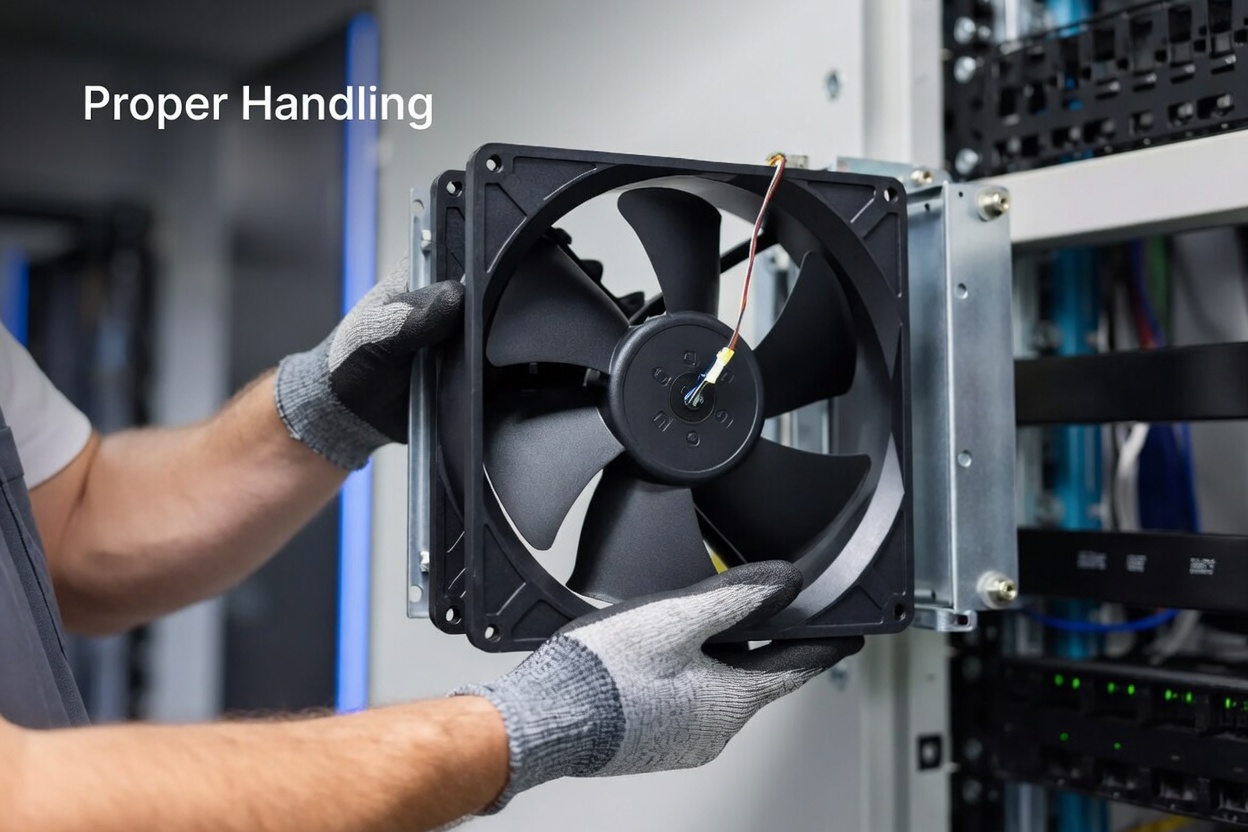
From receiving inspection to field service, the way your team physically touches a fan will show up later in failure rates. I recommend training technicians around a simple checklist of "dos" that becomes part of your internal work instructions. [socialhead]
- Support the frame, not the blades or hub. Avoid squeezing blades or pushing on the impeller; this can stress the bearing and deform plastic. [socialhead]
- Protect against shocks and drops. Even minor impacts can shorten bearing life, especially for high‑speed DC fans. [socialhead]
- Keep ESD protection for electronics. For fans with integrated drivers or speed sensors, standard ESD precautions are good practice. [innovationvisual]
- Keep them in original packaging until installation to avoid dust contamination and mechanical damage. [socialhead]
- Store in a clean, dry, and temperature‑controlled area, away from vibration and chemical fumes. [socialhead]
- Avoid stacking heavy objects directly on fan cartons or trays, which can warp frames or crack housings. [socialhead]
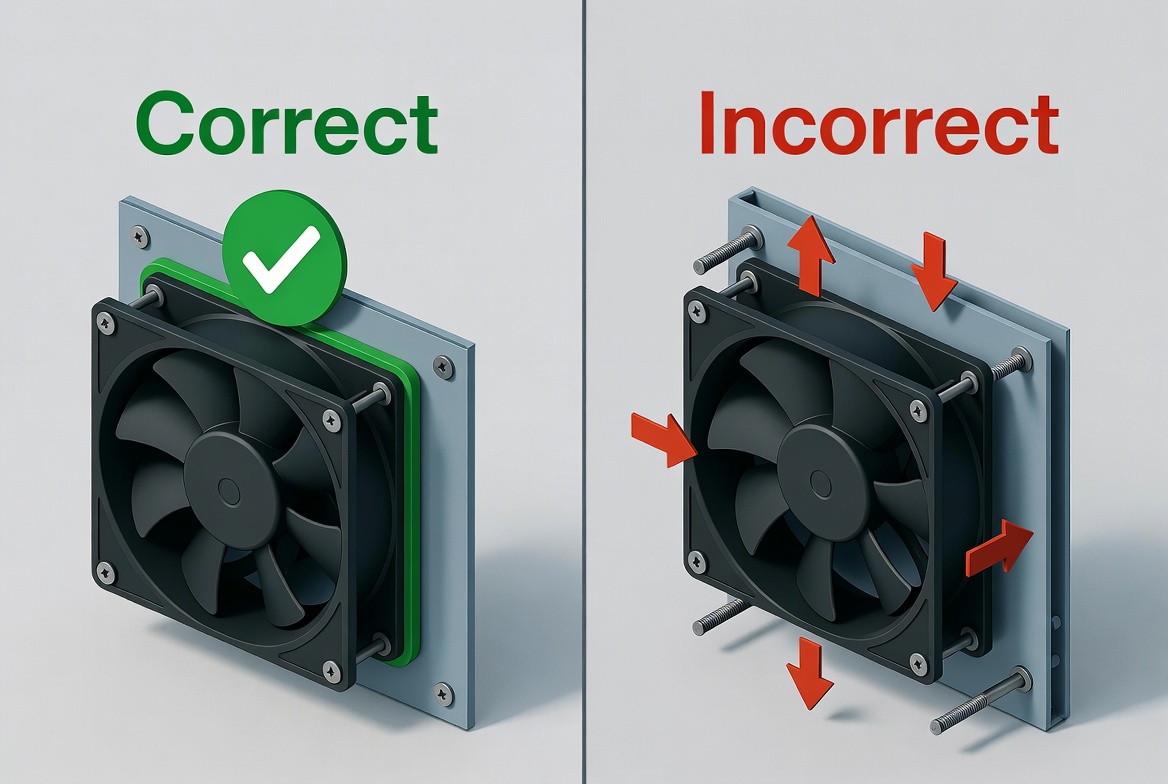
- Use proper mounting hardware (correct screw size and length) and avoid overtightening, particularly with plastic frames. [socialhead]
- Ensure the frame sits flat and flush against the panel, using gaskets or seals where needed to prevent air leakage. [socialhead]
- For vibration‑sensitive applications, use vibration‑absorbing grommets but still maintain alignment and sealing. [socialhead]
- Keep intake and exhaust sides clear of cables, labels, grills, or structural parts that can block flow. [socialhead]
- Maintain recommended clearance distance from obstacles on both sides of the fan to reduce turbulence and noise. [socialhead]
- Coordinate filter placement and maintenance to avoid progressive blockage over time. [socialhead]
- Schedule periodic inspections for dust buildup, loose screws, discoloration, and wire wear. [socialhead]
- Clean using compressed air, a soft brush, or a slightly damp cloth—only when the fan is powered off and fully disconnected. [socialhead]
- Use non‑corrosive, non‑conductive cleaning agents; aggressive chemicals can attack plastics and coatings. [socialhead]
For DC and AC fans from brands like CAPITAL or SANYO DENKI, the product datasheet and application notes are not optional reading. They include critical details on allowable voltage ranges, ambient temperature limits, and recommended safety margins that many teams overlook. [toprankmarketing]
Where I see the most damage is not in what teams do, but what they should avoid and don't. These "don'ts" come directly from field failures and RMA analysis. [socialhead]
- Fan leads are designed for electrical connection only, not mechanical load. [socialhead]
- Carrying or swinging a fan by its wires can damage solder joints, loosen terminals, or compromise insulation over time. [socialhead]
- If a connector doesn't mate smoothly, stop and check pin‑out, orientation, and part number. [socialhead]
- For AC fans, forced wiring connections introduce serious safety risks and potential for short circuits. [socialhead]
- Over‑voltage on a DC fan may temporarily "boost" speed, but it accelerates wear and can burn driver ICs. [socialhead]
- Overloading a power rail with too many fans on one line can cause brownouts, noise, and random resets elsewhere in the system. [innovationvisual]
- Avoid operating standard fans in extreme temperatures, corrosive atmospheres, or high humidity unless you're using a fan rated for those conditions (e.g., IP68). [socialhead]
- In outdoor or coastal deployments, choose high‑reliability, sealed models and confirm salt‑mist resistance where relevant. [innovationvisual]
- Grinding, rattling, or sudden changes in tone are early warnings of bearing or balance issues. [socialhead]
- Treat abnormal vibration as a maintenance alarm, not background noise, and log it in your asset management system. [socialhead]
- Opening a fan, removing labels, or disturbing balance weights often makes the unit non‑serviceable and unsafe. [socialhead]
- For high‑value systems, it also creates traceability gaps if you later need warranty support or failure analysis from the manufacturer. [socialhead]
- Cracked blades, warped frames, frayed wires, or oil contamination are all reasons to replace immediately. [socialhead]
- Running damaged fans increases the risk of catastrophic failure, short circuits, or debris entering critical components. [socialhead]
- Unless explicitly rated (e.g., IP68), fans should not be submerged or heavily exposed to liquids. [socialhead]
- Never stop blades by hand or with tools while energized; you risk damaging the motor, blades, and your own safety. [socialhead]
In practice, handling DC and AC fans involves slightly different mindsets. [socialhead]
- Signal wiring: Many DC fans include tachometer (FG), PWM control, or alarm signals; always route these separately from high‑noise power lines. [socialhead]
- Soft‑start and PWM: Use recommended PWM frequency ranges from the datasheet to avoid acoustic noise and driver stress. [socialhead]
- Redundancy: In telecom racks, it's common to use N+1 DC fan redundancy, but only if control logic correctly handles fan failure signals. [socialhead]
- Isolation and grounding: AC fans require careful attention to creepage, clearance, and protective earth in line with local standards. [socialhead]
- Inrush current: Some AC models draw higher inrush; size protection devices accordingly to avoid nuisance trips. [socialhead]
- Global deployments: Choose models designed for multi‑voltage mains or match fan versions to country‑specific line voltages. [socialhead]
Comparison Table
| Aspect | DC Fan Handling Best Practice | AC Fan Handling Best Practice |
|---|---|---|
| Power connection | Match rated DC voltage and polarity socialhead | Match line voltage and frequency socialhead |
| Control & monitoring | Use PWM, tach, alarms as specified socialhead | Typically on/off, sometimes speed selector socialhead |
| Safety focus | Protect electronics and wiring socialhead | Meet insulation and grounding standards socialhead |
| Typical applications | Telecom, servers, EV charging, power supplies socialhead | AC cabinets, industrial equipment, HVAC enclosures socialhead |
| Failure impact | Local hotspot and module shutdown socialhead | Cabinet overheating and potential safety hazard socialhead |
Beyond handling, the surrounding design choices have a huge impact on longevity. When I review customer systems, I usually look at three areas first. [innovationvisual]
- Maintain smooth airflow paths—avoid sharp corners, sudden cross‑section changes, and cable "nets" in front of the fan. [socialhead]
- Use grills and finger guards that are aerodynamically optimized, not just aesthetically pleasing. [socialhead]
- Validate the design with basic smoke tests or CFD, especially in dense enclosures. [socialhead]
- Keep fan supply rails stable and within tolerance; noisy rails reduce driver life. [socialhead]
- Implement smart fan control based on temperature sensors rather than fixed full‑speed operation, which reduces noise and extends life. [socialhead]
- Use monitoring (tach, alarm) and log anomalies for preventative maintenance. [toprankmarketing]
- Create a maintenance SOP that includes inspection intervals, cleaning methods, and clear replacement criteria. [toprankmarketing]
- Train technicians with real examples of damaged vs acceptable fan conditions, including photos and sample units. [socialhead]
- Document fan models, batch codes, and installation dates for traceability. [socialhead]

Consider a typical outdoor telecom base station that relies on multiple DC fans for forced convection. [socialhead]
- When fans are mounted with small gaps between the frame and panel, hot air recirculates inside the cabinet and the top modules hit thermal limits faster. [socialhead]
- After switching to properly sealed frames, cleaning filters on schedule, and setting fan speed to ramp up based on real sensor data, one customer saw a measurable reduction in thermal alarms and unplanned service visits. [toprankmarketing]
These are not exotic changes—they are simple handling and design disciplines applied consistently.
To bring everything together, here is a concise handling checklist you can adapt into your internal procedures:
1. Receiving and storage
- Verify model, voltage, and batch against purchase order. [socialhead]
- Store in original packaging in a clean, dry place. [socialhead]
2. Pre‑installation check
- Inspect frame, blades, and wires for visible damage. [socialhead]
- Confirm airflow direction and mounting orientation. [socialhead]
3. Installation
- Mount the fan by the frame using correct screws and torque. [socialhead]
- Seal frame to panel where required; avoid air gaps. [socialhead]
- Connect power and signal wires exactly per wiring diagram. [socialhead]
4. Commissioning
- Power on and check for abnormal noise or vibration. [socialhead]
- Confirm tachometer output and alarms (if available) are within expected range. [socialhead]
5. Operation and maintenance
- Inspect at defined intervals; clean dust safely. [socialhead]
- Replace fans showing damage, abnormal noise, or failing monitoring signals. [socialhead]

For complex systems—such as high‑density telecom racks, industrial power supplies, or smart charging infrastructure—it is often worth bringing in the fan manufacturer or an experienced thermal engineer early. [toprankmarketing]
You should consider external support when:
- You are deploying in extreme environments (high altitude, coastal, dusty, or corrosive conditions). [socialhead]
- You plan to run fans close to their limits for temperature, pressure, or speed. [socialhead]
- You need to harmonize DC and AC fan strategies across multiple product lines or regions. [socialhead]
A qualified partner can review your handling practices, design assumptions, and test data, and help you select models and accessories that match your real‑world conditions.
If you are responsible for product reliability, my recommendation is simple: treat cooling fan handling as part of your core engineering process, not an afterthought. [toprankmarketing]
- Document a fan handling and installation standard for your team. [socialhead]
- Audit a sample of existing cabinets or systems to identify handling‑related risks. [socialhead]
- Work with your fan supplier to align on best‑practice installation, testing, and maintenance in your specific applications. [toprankmarketing]
By turning these expert practices into a repeatable standard, you dramatically lower thermal incidents and extend the life of every DC and AC cooling fan in your portfolio. [socialhead]
For most telecom and industrial installations, a visual inspection every 3–6 months and cleaning as needed is a good starting point, but the interval should be adjusted based on dust levels and environment. [innovationvisual]
Reducing voltage will slow a DC fan, but running below the specified range can cause unstable operation; using PWM control within the datasheet's recommended parameters is generally safer and more precise. [socialhead]
The most common causes are bearing wear from vibration and high temperature, often made worse by poor mounting, obstructed airflow, and lack of regular cleaning. [socialhead]
You should replace a fan if you notice cracked blades, warped frames, frayed wires, persistent abnormal noise, or inconsistent tach signals, even after cleaning and re‑seating. [socialhead]
Technically it is possible, but it complicates control, spare parts, and performance consistency; aligning on a small set of qualified models and brands usually yields better long‑term reliability. [toprankmarketing]
1. Orion Fans, "A Guide to Handling Cooling Fans / How to Handle Cooling Fans" (accessed 2026). [socialhead]
2. Semrush, "Google E‑E‑A‑T: What It Is & How It Affects SEO." [](https://www.semrush.com/blog/eeat/)
3. TopRank Marketing, "E‑E‑A‑T and SEO: Optimizing for Google's Guidelines." [](https://www.toprankmarketing.com/blog/eeat-seo-google-guidelines-experience-expertise-authority-trust/)
4. Innovation Visual, "Google's EEAT Guidelines – How To Remain Compliant." [](https://www.innovationvisual.com/knowledge-hub/resources/google-eeat-guidelines-how-to-remain-compliant)
5. Manufacturing Success, "How to Write a Blog Post for Your Manufacturing Business." [](https://www.manufacturingsuccess.org/blog/how-to-write-a-blog-post-for-your-manufacturing-business)


