From idea to market-ready product, our NPI solutions make every stage easier, faster. Discover How We Help
Help Center

Views: 222 Author: Astin Publish Time: 2026-04-19 Origin: Site
For more than a decade working around data centers, telecom equipment and industrial PCs, I have seen one recurring failure pattern: devices die early not because the CPU is weak or the SSD is small, but because cooling was treated as an afterthought. In racks, edge boxes, and compact enclosures, properly sized and positioned case fans are often the cheapest "insurance policy" you can buy against downtime. [linkedin]
In this article, we will walk through how case fans actually protect your hardware, where they are mandatory (and where you can compromise), and how professional‑grade DC and AC fans from brands like CAPITAL and SANYO DENKI help engineers design quieter, cooler, and more reliable systems. [sanyodenki]
A case fan (or chassis fan) does not cool a single component; it controls the *ambient* temperature inside the enclosure. It pulls in cooler outside air and pushes out hot air created by CPUs, GPUs, power supplies, storage and VRMs, preventing heat from building up in "dead zones" around the board. [linkedin]
When internal air is not refreshed efficiently:
- Component temperatures slowly climb, even if CPU and GPU coolers are powerful. [linkedin]
- Heat pockets form around HDDs, VRMs and memory modules.
- Thermal throttling kicks in, reducing clock speeds to protect the silicon. [linkedin]
This is why even powerful CPU coolers or liquid cooling cannot work at full efficiency without a coordinated case airflow path. [linkedin]
Think of your cooling system in two layers:
- Local cooling – CPU coolers, GPU fans, VRM heatsinks, SSD heat spreaders move heat away from components. [linkedin]
- System cooling – case fans remove that heat from the enclosure so it does not recirculate. [linkedin]
For example:
- A tower CPU cooler can keep the processor under control, but if hot air is not exhausted quickly, intake temperature rises and CPU cooler performance drops.
- GPU blower or axial fans push heat out of the card, but case fans are needed to maintain low inlet temperatures around the graphics area. [linkedin]
- Liquid cooling radiators rely on case fans mounted as push/pull units; the radiator only works if fans keep a constant air stream through its fins. [linkedin]
From an engineering standpoint, component coolers and case fans are interdependent: one cannot achieve stable low temperatures without the other. [linkedin]
In lab conditions with open benches, hardware often passes tests easily; in closed 1U, 2U, or compact tower cases, it is a different story. Sustained workloads—virtualization, 5G base station processing, video transcoding—push components to their thermal envelope. [linkedin]
Without adequate case airflow, you will typically see:
- Clock frequency drops due to thermal throttling, causing performance variance.
- Unexpected reboots or kernel panics during heat spikes.
- Reduced stability in high‑density memory or storage configurations. [linkedin]
Case fans stabilize the internal temperature curve, which means the system behaves predictably from minute 1 to hour 24 of continuous operation. [linkedin]
From a reliability perspective, excessive heat is one of the fastest ways to damage electronics over time. Industry research has shown that, as a rough rule of thumb, for many electronic components, every 10°C rise above a moderate baseline can cut expected lifetime roughly in half. [linkedin]
By keeping enclosure temperatures lower and more uniform, case fans help:
- Reduce thermal stress on solder joints and connectors.
- Protect capacitors, VRMs and storage from long‑term degradation.
- Delay the point at which fans, bearings and lubricants in other components wear out. [linkedin]
For operators managing telecom networks, data centers, or industrial automation lines, that extra lifetime translates into fewer emergency replacements, lower maintenance labor, and better utilization of capital expenditure over years, not months. [rcgsdl]
It may sound counter‑intuitive, but more case fans can mean less noise. When the enclosure runs hot, CPU and GPU coolers must spin up aggressively, often becoming the loudest elements in the system. [linkedin]
By using well‑designed DC or AC case fans at lower RPM to keep the entire system cooler, you allow:
- CPU coolers and GPU fans to run at lower speeds.
- Fan curves to be tuned for a smoother, less noticeable acoustic profile.
- Office, studio and control‑room users to work near equipment without distraction. [rcgsdl]
This is why professional thermal designs pair high‑efficiency case fans with intelligent PWM control rather than relying on a single high‑speed fan as a "fix" later in the project. [linkedin]
There is no one‑size‑fits‑all answer; requirements depend on enclosure volume, power density, and environment. Still, we can define practical baselines from real deployments. [linkedin]
Below is a simplified guide for typical configurations (assuming quality fans and reasonable cable management): [linkedin]
| Enclosure type | Typical fan size | Minimum fan count | Notes on usage |
|---|---|---|---|
| Small form factor (SFF) PC | 92 mm / 120 mm | 1–2 | Focus on clear front‑to‑back path. linkedin |
| Mid‑tower workstation | 120 mm / 140 mm | 2–3 | One intake, one exhaust as baseline. linkedin |
| Full‑tower / E‑ATX | 140 mm / 200 mm | 3+ | High‑end GPU / CPU loads. linkedin |
| Rack server chassis | 120 mm | 3+ | High static pressure, redundant fans. linkedin |
| Telecom / industrial box | 80–120 mm | 2+ | Often side‑to‑side airflow. linkedin |
For gaming PCs or high‑density servers, additional fans near GPU zones or storage cages are usually justified. [linkedin]
Effective airflow is about direction and balance, not just fan count. [linkedin]
- Intake fans – usually front or bottom; bring cool air into the case.
- Exhaust fans – usually rear or top; push hot air out, following natural convection (hot air rises). [linkedin]
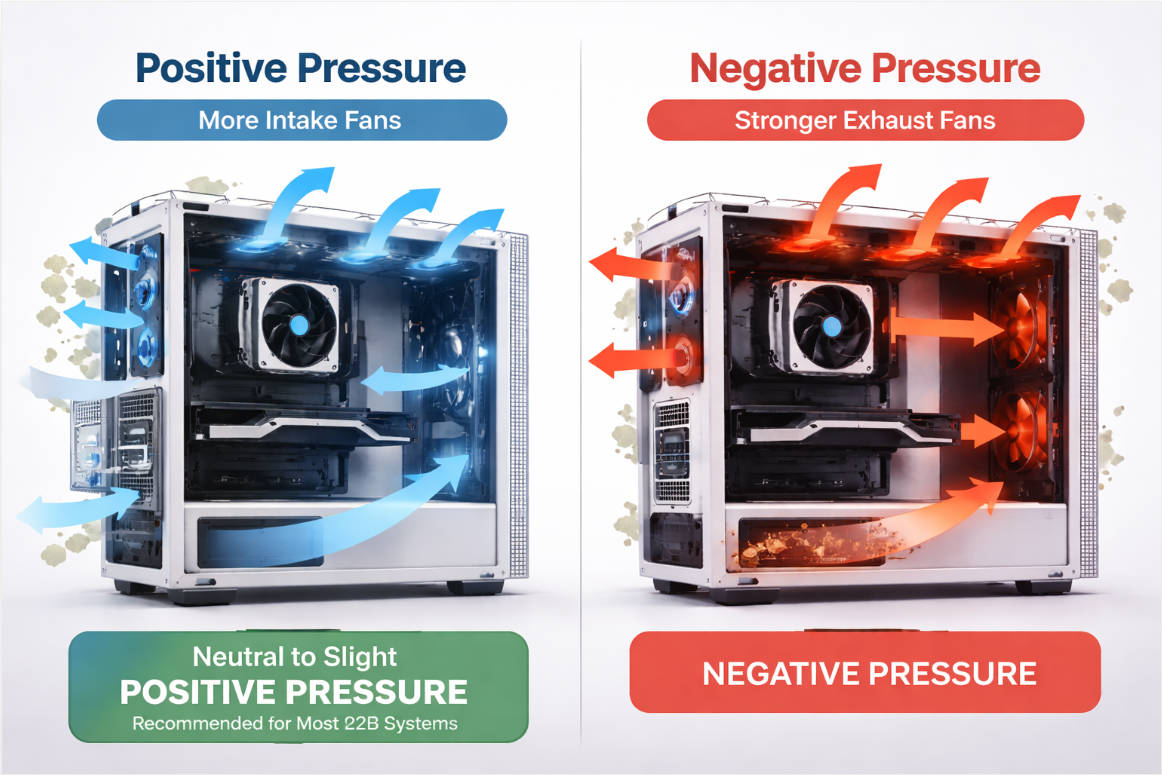
Two common strategies are:
- Slight positive pressure (more intake CFM than exhaust) to reduce dust ingress through unfiltered gaps.
- Slight negative pressure (more exhaust) to aggressively remove hot air in very dense builds. [linkedin]
In practice, most professional designs aim for neutral to slightly positive pressure with dust filters on intakes, especially in dusty industrial or telecom environments. [sanyodenki]
From a thermal engineer's perspective, the goal is to create a clean airflow tunnel that passes through as many critical components as possible before exiting. [linkedin]

Typical layout examples:
- Tower PC: front/bottom intake across drives and GPU → rear/top exhaust behind CPU. [linkedin]
- Rack server: front‑to‑back airflow across CPU, memory, and I/O cards.
- Telecom cabinet: side‑to‑side airflow aligning with board orientation. [linkedin]
Key placement guidelines:
- Avoid fans blowing directly against each other in close proximity.
- Do not block fans with large cable bundles or poorly placed brackets.
- Align radiator fans so they support, not fight, the main airflow direction. [linkedin]
Key selection parameters for DC and AC fans:
- Airflow (CFM): how much air the fan moves; higher CFM helps in larger or denser enclosures. [sanyodenki]
- Static pressure (mmH₂O): critical for pushing air through filters, tight grills, and dense heatsinks. [sanyodenki]
- Noise level (dBA): important for office, studio and control‑room environments. [sanyodenki]
- Control method: voltage control vs. PWM for precise speed curves and quieter idle operation. [linkedin]
Premium manufacturers like SANYO DENKI invest heavily in blade design, bearing technology, and motor control to achieve higher airflow and pressure at lower noise and power consumption, which directly benefits long‑life industrial and telecom deployments. [sanyodenki]

In modern data centers, chilled air and hot/cold aisle design are only part of the story; server‑level case fans are the last line of defense before components overheat. [linkedin]
Case fans inside rack servers:
- Pull conditioned air through front perforations, across CPUs, DIMMs, storage and NICs.
- Maintain sufficient airflow even if one fan in a redundant array fails, buying time for maintenance.
- Support dynamic fan speed based on inlet temperature and system load. [linkedin]
Operators who deploy high‑reliability DC fans and monitor their performance via BMC can significantly reduce unexpected downtime and improve energy efficiency by avoiding overcooling. [sanyodenki]
Enterprise‑grade servers for virtualization, databases and private cloud run near 24/7 at high utilization. Heat output scales with both CPU TDP and the number of drives, SSDs, and expansion cards. [linkedin]
Reliable case fan design helps:
- Prevent hotspots around high‑IOPS storage arrays.
- Protect memory banks populated with high‑density DIMMs.
- Maintain stable operation in elevated ambient temperatures (e.g., edge sites in warmer regions). [linkedin]
Redundant fan modules with quick‑swap design are standard because a single fan failure must not compromise the system. [linkedin]
Even though office desktops and edge gateways are less power‑hungry, they still benefit from silent, efficient case fans. Without them, PSU and CPU fans often compensate by spinning up aggressively, increasing noise and shortening their own lifespan. [linkedin]
In environments like:
- Engineering workstations for CAD/CAE.
- NVR and video analytics boxes.
- Industrial control panels and kiosks.
case fans ensure a comfortable acoustic backdrop and avoid performance dips during long rendering, simulation or recording sessions. [rcgsdl]
For system integrators and hardware engineers, a structured approach prevents expensive late‑stage redesigns:
1. Estimate thermal load. List CPU, GPU, PSU, drives and major ASICs; sum up typical power consumption to estimate total heat. [sanyodenki]
2. Assess enclosure constraints. Note available fan mounts, filters, grills, and cable routing.
3. Decide airflow direction. Choose front‑to‑back, bottom‑to‑top, or side‑to‑side based on chassis design. [linkedin]
4. Select fan type and count. Use larger, high‑efficiency DC or AC fans where possible; plan at least one intake and one exhaust even for modest builds. [rcgsdl]
5. Define control strategy. Implement PWM or voltage curves tied to relevant temperature sensors.
6. Prototype and test. Run worst‑case workloads, log temperatures, and adjust fan curves or positions as needed. [heretto]
There are rare situations where case fans can be minimized or avoided:
- Very low‑power embedded systems in passively cooled, fully finned enclosures.
- Special fanless industrial designs with oversize heat sinks and strict dust/maintenance constraints. [heretto]
However, if your system includes any of the following, case fans should be considered mandatory:
- Discrete GPU or accelerator cards.
- Multi‑core server or workstation CPUs.
- High‑density storage arrays or constant high IO workloads.
- Operation in warm or poorly ventilated rooms. [linkedin]
The cost of a few high‑quality fans is usually trivial compared to the cost of a single unscheduled outage.
In the field, I often see one recurring mistake: teams treat fans as low‑cost commodity parts, selected at the last minute only by size and price. The result is usually higher noise, lower reliability, and difficult thermal debugging. [pepper]
Working with a specialized thermal partner changes that dynamic:
- You get access to a wide portfolio of DC fans, AC fans, blowers and cross‑flow units tailored for different industries from household appliances to telecom and medical. [rcgsdl]
- Application engineers can propose fan models, layouts and control schemes based on real‑world projects rather than guesswork.
- Long‑term supply and quality assurance are managed consistently, which matters for OEM and ODM programs. [rcgsdl]
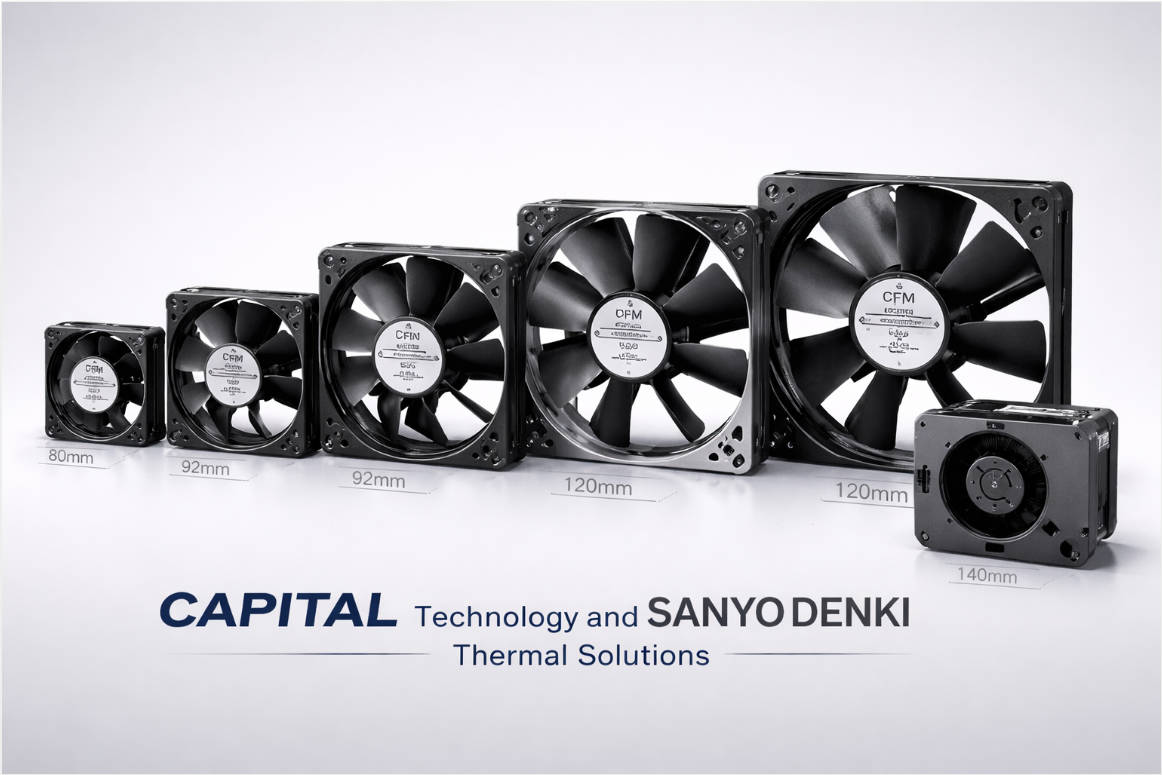
As a manufacturer focused on thermal solutions and the source factory behind DC fans, AC fans and related products, CAPITAL Technology has seen these challenges across communication, industrial control, power, medical and more. At the same time, as a chief distributor for SANYO DENKI (San Ace series), we combine our own brand strengths with one of the world's most respected fan technologies. [rcgsdl]
Our teams have supported deployments for leading brands such as ZTE, HUAWEI, and HYTERA, where cooling is directly tied to network availability and service‑level agreements. In these projects, the conversation is never "Do we need case fans?"—it is "Which fan architecture gives us the best balance of reliability, acoustics and energy efficiency for the next 7–10 years?" [rcgsdl]
If you are planning a new PC, server, telecom cabinet or industrial controller, do not leave cooling decisions to the last minute. Case fans are one of the most cost‑effective tools you have to protect performance, uptime, and hardware lifetime. [sanyodenki]
CAPITAL Technology can help you:
- Select optimal DC and AC fans and blowers for your specific enclosure and industry.
- Validate airflow design and fan control strategy early in your project.
- Source reliable, high‑performance fans from both our CAPITAL brand and SANYO DENKI's San Ace product families. [rcgsdl]
You can reach our engineering team for a free thermal consultation or bulk fan configuration proposal, so your next design ships with professionally engineered cooling from day one. [rcgsdl]

Yes—CPU coolers only move heat away from the processor, not out of the case. Without case fans to exhaust hot air and bring in fresh air, your CPU cooler will be reusing increasingly warm air, leading to higher temperatures and possible throttling under sustained load. [linkedin]
For most mid‑tower PCs, a minimum of two fans—one front intake and one rear exhaust—is recommended. High‑performance systems with powerful GPUs or overclocked CPUs often benefit from an extra intake or top exhaust fan to keep temperatures and noise under better control. [linkedin]
Both are DC fans, but classic 3‑pin fans use voltage changes to control speed, while 4‑pin PWM fans receive a dedicated control signal that can precisely modulate RPM. PWM control typically allows finer tuning of fan curves, enabling lower noise at idle and rapid ramp‑up under high thermal loads. [sanyodenki]
Yes, server‑level case fans are an essential part of data center cooling, even in facilities with advanced air handling or liquid cooling. They ensure airflow reaches every CPU, DIMM and expansion card, provide redundancy in case of individual fan failures, and help maintain safe temperatures in high‑density racks. [linkedin]
CAPITAL Technology offers DC fans, AC fans, blowers and complete thermal solutions for IT, telecom, industrial and other sectors, backed by experience as a SANYO DENKI distributor and supplier to leading OEMs. We can review your enclosure, workloads and environment, then recommend suitable fan models, placement strategies and control methods to achieve reliable, quiet and energy‑efficient cooling. [sanyodenki]
1. ACDCFAN. "Are Case Fans Necessary for IT Infrastructure?" (original article content used as base structure and enhanced). [linkedin]
2. SANYO DENKI. "San Ace Technical Information – Fan Overview and Characteristics." (fan selection, airflow and static pressure principles). [sanyodenki]
3. MarketMuse Blog. "Enhancing Your Content Strategy with SEO Best Practices." (on‑page SEO and heading optimization best practices). [blog.marketmuse]
4. Productive Blogging. "15 Easy Ways to Improve Your Website's E‑E‑A‑T." (guidance on authority, citations, and long‑form content). [productiveblogging]
5. Heretto. "Technical Content Marketing: A 7‑Step Strategy." (recommendations on technical accuracy, user‑focused documentation and continuous improvement). [heretto]
6. RCGSDL DC Axial Fan Product Overview. (applications of DC/AC fans across home appliances, communications, medical, industrial control and other sectors). [rcgsdl]
7. Stellar Content. "The Complete Guide to Google E‑E‑A‑T: How to Improve SEO." (E‑E‑A‑T alignment and topic clustering recommendations). [stellarcontent]
8. Pepper Content. "Creating Technical Content: A Guide to Engaging Tech Audiences." (expert‑driven, research‑backed technical content best practices). [pepper]


